
Replace and stop slots
This is for AWS ecs-ec2 deployments only. Move workspaces off outdated slots onto new ones, and stop a slot that no longer answers.
On ecs-ec2 a workspace runs on an EC2 slot taken from a pool, and its home is an EBS volume that stays attached to that slot while it is stopped. The stack parameters and commands are in the ECS runbook’s “EC2 slot pool”.
How it works
Section titled “How it works”| What you do | What happens |
|---|---|
| Nothing | An outdated slot moves to a new slot at the next start of the workspace whose home is on it. A free outdated slot is terminated by the sweeper |
| Press “Replace at next start” | The workspace on that slot always moves to a new slot at its next start, and never goes back to the old one |
| Press “Stop (force)” | The commands queued on a slot that does not answer are cancelled and the instance stops. The home stays on it |
Watch the audit log for pool.slot_dark_detected |
You notice a slot that does not answer before anyone starts on it |
The slots page is “Admin” → “Slots”, and only super_admin can use it.
Outdated slots
Section titled “Outdated slots”A slot reads its user data only when it is launched, and a stopped workspace goes back to the same slot on its next start. A change to the slot launch template (a release’s security setting, for example) therefore does not reach the slots you already have. Replace them here instead of terminating instances by hand.
A slot is “outdated” in either of these cases. The tooltip gives the reason.
| Reason | Detail |
|---|---|
| AMI behind | Its AMI is not Amazon’s current ECS-optimized AMI for its architecture |
| Template changed | The slot launch template changed in something other than its AMI |
- The Control Plane reads Amazon’s public SSM parameters about every hour and launches every slot, x86_64 and arm64, with the current AMI. Slots follow Amazon’s updates without a stack deploy
- The launch template version number alone does not decide. A version that only moved the AMI does not make an arm64 slot outdated
- If SSM cannot be read, launches use the last value read, or else the CloudFormation values. No slot is called outdated on an AMI the Control Plane does not know
- There is no grace period. The first new AMI makes every slot outdated at the first sweep
- A running workspace is never touched outside a start
Automatic replacement
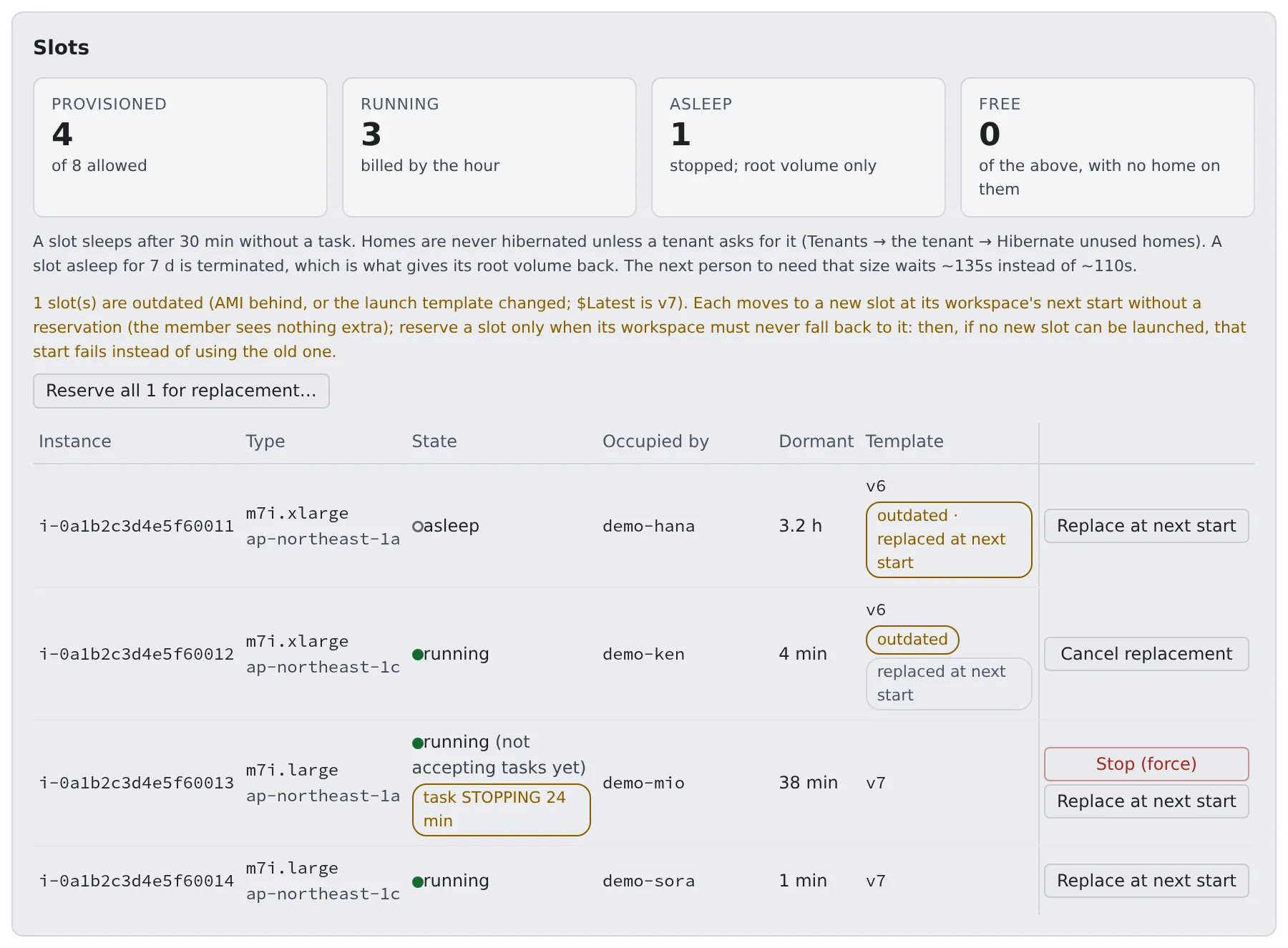
Section titled “Automatic replacement”By default outdated slots are replaced automatically. The page shows “outdated · replaced at next start”.
- When a workspace starts and its home is on an outdated slot, that start moves it to a new slot. The member’s workspace bar shows nothing
- A free outdated slot is terminated by the sweeper
- If no new slot can be launched (capacity, quota), the start still succeeds on the old slot, and starts within the next 10 minutes stay on it without trying again
- Each automatic move is in the audit log as
pool.slot_replace_auto - To turn it off, set
AF_ECS_EC2_AUTO_REPLACE_OUTDATED_SLOTS=falseon the Control Plane
Reserve slots yourself
Section titled “Reserve slots yourself”Reserve a slot yourself when its workspace must never go back to it. A start that cannot launch a new slot then fails instead.
- Open “Admin” → “Slots”. The “Template” column shows the launch template version each slot was launched from
- Reserve
- To reserve them all, press “Reserve all N for replacement…”. It lists the outdated slots and the workspace on each; check them and reserve
- To reserve one, press “Replace at next start” on its row. A reserved row shows “replaced at next start”; “Cancel replacement” takes it back
- Nothing happens to a running workspace. Its member sees “Moves to a new slot” in the workspace bar
- The member’s next stop and start launches a new slot with the current AMI and
$Latest, moves the home onto it and terminates the old one. That start takes about 25 seconds longer than usual. Files, repositories and logins come along; the home is never deleted
Reservations and cancellations are in the audit log as pool.slot_replace_reserve / pool.slot_replace_cancel, with the workspace that moves.
| Symptom | Cause and fix |
|---|---|
| A reserved workspace’s start fails with a reason | No new slot could be launched (capacity, quota). The reservation stays, and the workspace is never put back on the old slot. Retry later |
| A reserved slot is gone | The sweeper terminates a reserved slot with no workspace on it |
How to verify the result is in the ECS runbook’s “Moving retained slots onto new user data”.
Protect the management agents from running out of memory
Section titled “Protect the management agents from running out of memory”So that a workspace that eats all the memory does not leave a slot whose EC2 is healthy but whose agents no longer answer, the slot’s user data gives the management processes a memory floor.
| Target | Floor |
|---|---|
| SSM agent | 192 MiB, systemd MemoryMin |
| docker | 256 MiB, systemd MemoryMin |
| containerd | 128 MiB, systemd MemoryMin |
| ECS agent | 192 MiB, memory.min on its scope, set by the helper service af-protect-mgmt |
system.slice |
832 MiB in total, so the children’s floors take effect |
- The ECS agent runs as a docker container, not as a child of
ecs.service, soaf-protect-mgmtlooks for its scope. It re-applies every 30 seconds, so it follows an agent restart af-protect-mgmtalso lowers the OOM score of the ECS and SSM agents, including an SSM agent already running at first boot- When memory runs short, the kernel reclaims the workspace containers’ pages first
- The total fits inside the host reserve (
AF_ECS_EC2_HOST_RESERVE_MB, 1024 MiB or more by default). A reserve below 832 MiB makes the protected amount exceed the reserve - It assumes cgroup v2 (the Amazon Linux 2023 default)
This is a launch template change. It reaches existing slots only through the replacement in Outdated slots.
Stop a slot that does not answer
Section titled “Stop a slot that does not answer”A slot can stop answering: the EC2 instance is running and its status checks are ok, but its ECS agent is not connected, SSM does not answer, and a member’s home is still attached. That member’s starts then wait or keep failing.
The page shows such a row with “(not accepting tasks yet)” and offers “Stop (force)”.
Update the 20-platform stack first. The Control Plane role needs ssm:ListCommands, ssm:CancelCommand and ssm:DescribeInstanceInformation (statement SsmSlotForceStop in 20-platform). Without them the health check fails with AccessDenied and the action cannot run.
- Press “Stop (force)” on the row. The confirmation names the workspace on the slot; check it and stop
- The Control Plane ends the member’s start on that slot (their workspace reads as stopped), cancels the commands it queued and stops the instance. A pending umount or mount is what holds the home’s lock
- The result (commands cancelled, whether Force was used) appears on the page. The audit log records
pool.slot_force_stopwith the workspace, both health signals and the counts - Wait for the row to show “asleep”. The member’s next start wakes this same slot through the ordinary path. The reboot clears what was stuck, and the ECS agent reconnects
The slot is not quarantined, and the home stays on it. Keeping an instance as evidence is what quarantine is for, and a slot that does not answer is never quarantined automatically.
How the stop proceeds
Section titled “How the stop proceeds”- It sends a normal shutdown first, so the kernel can unmount the home. If the instance has not stopped after 3 minutes, the Control Plane sends it again with Force. Pressing the button again while it is stopping forces it at once. A timer never acts on an instance started again since
- If ECS still has a task network interface (ENI) on the slot, the Control Plane first force-deregisters the slot’s container instance and waits for the interface to go. The container instance registers again when the instance restarts
- An instance stopped with a task ENI attached comes back with two interfaces and no automatically assigned public IPv4. On a public subnet it has no egress and its agent cannot reconnect, so the ENI goes first. A slot with no task ENI is not deregistered
- The whole action is held to about 50 seconds, so the reply arrives before the 60-second ingress timeout. The ENI wait gets at most 30 of them
When it is refused
Section titled “When it is refused”| Code | Meaning and fix |
|---|---|
slot_healthy |
The ECS agent is connected and SSM is online. The action is for slots that do not answer. The API has an explicit override for stopping a healthy slot, which the Console never sends; it also stops a workspace running on that slot |
slot_not_running |
The slot is already stopped |
slot_quarantined |
The slot is quarantined |
slot_task_eni_held |
The task ENI did not go in time. The instance keeps running. Wait a minute and press again |
slot_started_again |
The member started the workspace again meanwhile. The slot is theirs, so nothing more is done to it |
After the stop
Section titled “After the stop”| Symptom | Cause and fix |
|---|---|
| The workspace stays on “starting” | A start made while the instance is still stopping gives up waiting after about two minutes and stays on “starting” until its claim expires. Stop the workspace and start it again |
| The row shows “task STOPPING N min” | The agent could not report a stop, so ECS keeps the previous task as STOPPING. The service allows one task at a time, so the next start waits for it. Once the instance runs again its agent reports the stop; the member’s next start after a force-stop does that, or you can start the instance from the EC2 console. The Control Plane does not do it on its own |
Notice a slot that does not answer
Section titled “Notice a slot that does not answer”The Control Plane’s sweeper looks for slots that do not answer before anyone starts a workspace on them. It only reports: it never stops, deregisters or quarantines the slot. Stopping it is “Stop (force)”.
A slot is considered dark when all of these hold:
- It holds a home, and no start is in flight
- EC2 says
running, but its ECS agent is disconnected (or the instance is not registered) - SSM does not report it
Online - It was launched or started more than
AF_ECS_EC2_DARK_BOOT_GRACE_SEC(300 seconds by default) ago
| Stage | What happens |
|---|---|
| The first sweep that sees it dark | Tags the instance af-dark-since |
| A sweep that finds either agent healthy | Removes the tag. A stop and start of the instance voids it too |
Dark for AF_ECS_EC2_DARK_AFTER_SEC (600 seconds by default) |
Writes one log line and one pool.slot_dark_detected audit row |
AF_ECS_EC2_DARK_AFTER_SECis raised to at least the larger of the boot grace andAF_ECS_EC2_SLOT_LOST_AFTER_SECplus the sweep interval.0turns the scan offAF_ECS_EC2_DARK_SLOT_ACTIONisdetect(the default) oroff.rescueandquarantineare reserved for later and currently behave asdetect- Watch the audit log for a slot recorded as dark that was in fact healthy (an agent restart, a long stall). That tells you whether the thresholds are safe
Related
Section titled “Related”For agents
Send this prompt to your agent to read this page.
Read https://agent-fleet.org/docs/operate/aws-ecs/slot-maintenance/index.md