 Agent Fleet
Features
Everything around the agents, in one place
The front page shows the idea. This page shows what it adds up to: five walkthroughs, then the catalogue — each entry with a number where there is one and a link to the part of the user guide that covers it.
- Off by defaulta switch someone has to turn on first
- AWS onlydepends on the AWS editions
- Experimentala proof of concept that may change
In practice
Five walkthroughs
Recorded in the Console against a demo backend. Click a recording to see it full size.

Split a review across three agents Off by default
A Claude session splits a design review three ways and gives each part to a different agent.
- The Claude parent starts three child sessions: Codex on the data model and migrations, Antigravity on API compatibility, Muse Code on the UI.
- Each child works in its own worktree and is asked to report back once when it finishes.
- The parent pulls the three reports together. The fleet graph shows four lanes on a time axis, with an arrow for every start and message.
Starting sessions from sessions and messages between sessions are both off until you switch them on. A parent runs 3 children at once by default (1–10).
From an incident to a fix Experimental

Two assistants, two jobs: one reads the monitoring, the other starts the work.
- Ask the SRE assistant what is open on PagerDuty. It reads the incident, then the CloudWatch metrics and logs, and narrows down the cause.
- The SRE assistant is read-only: it cannot change anything or start a session. So you take the fix to the Fleet Operator.
- The Fleet Operator starts a Codex session in a new worktree with the fix as its task, and the session's report comes back to that conversation.
Alerts do not arrive in the chat on their own — you ask. PagerDuty, Grafana, CloudWatch and AWS are connected under Settings › Ops & monitoring.
From a ticket to a pull request, and its review
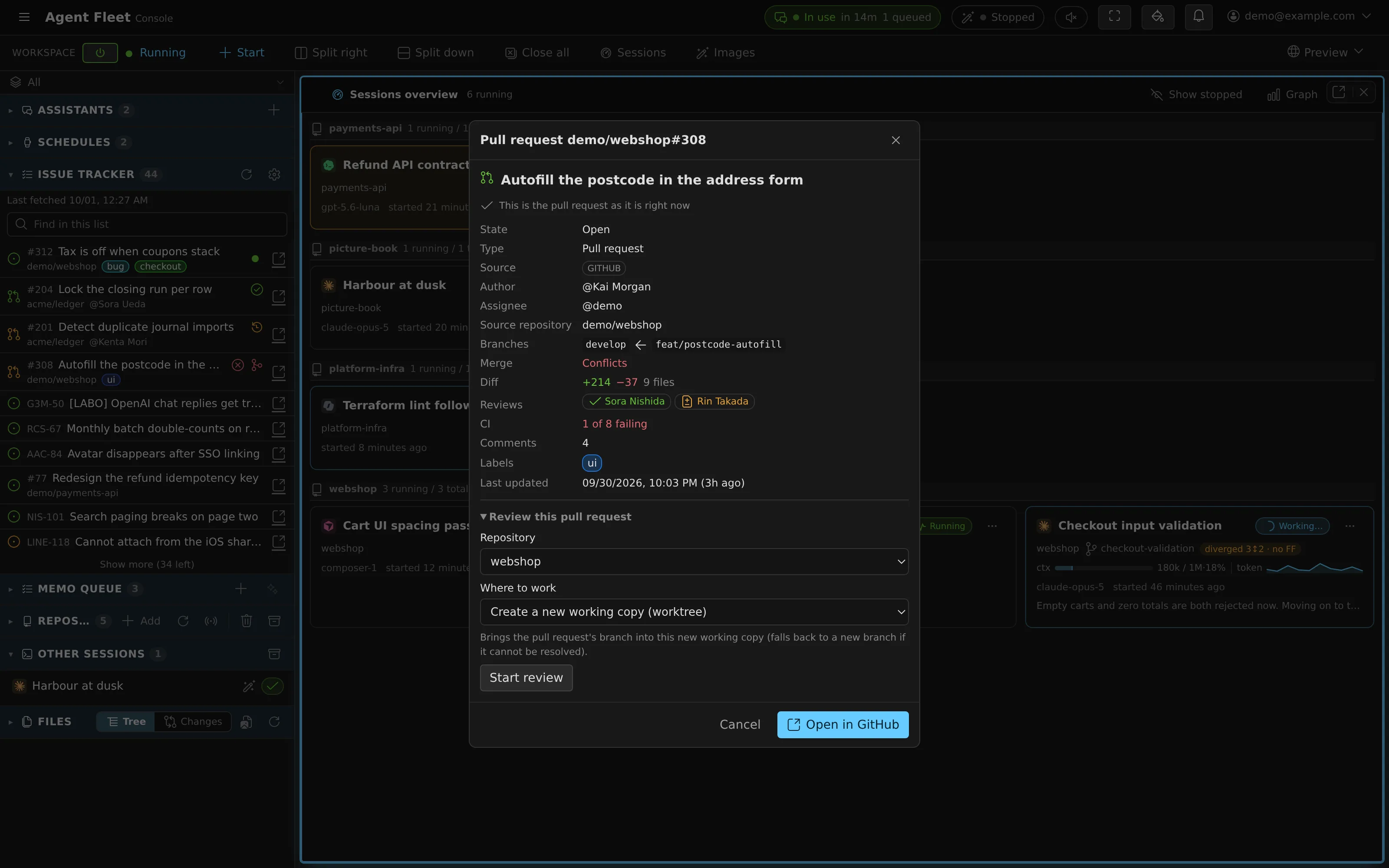
The issue tracker in the left pane gathers the work waiting for you.
- Save a query, and GitHub issues and pull requests, Jira issues and Bitbucket pull requests land in one list.
- Start a session from an issue. The branch name comes from your naming rules —
feature/45-empty-list, say — in a new worktree. - Open a pull request: its details show CI, merge conflicts and reviews, and “Start review” checks out the PR's own head branch in a new worktree.
CI and conflict marks sit on the list rows for GitHub pull requests; for Bitbucket they are in the details.
Approve the plan, then commit — in the browser

Nothing in this loop needs a terminal.
- Started in plan mode, the agent proposes a plan first. Approve it in place — or write comments on it, or have another session review it.
- It gets to work. The working copy's changes sit right beside the chat.
- Stage and commit yourself from the commit graph view: real git, per working copy.

Answer from your phone
Away from the desk, the Console runs in your phone's browser.
- The sessions overview shows which session is waiting on you.
- Open it and answer the question on its card, as you would at a desk.
- It carries on where it stopped, and the list shows it done.
Or answer in the session's Slack or Discord thread, once the chat bridge is connected and “Reply to steer” is on (it is off by default).
And overnight: scheduled runs and resuming after a usage limit are on the front page, in a day with Agent Fleet.
Catalogue
What it can do
Grouped by area. Every card links to the user guide, which is the authority on details and limits.
Sessions working together
A session can start other sessions and message them; the Fleet Operator starts and steers sessions for you.
-
Child sessions Off by default
A session starts up to 3 children at once by default (1–10), of any of the 9 agent kinds, each in a new worktree. One level deep: children cannot start their own. Each is asked to report back once.
-
Messages between sessions Off by default
Four kinds — request, question, answer and FYI. A stopped recipient is resumed to receive it. Up to 16 KiB a message and 6 a minute per sender.
-
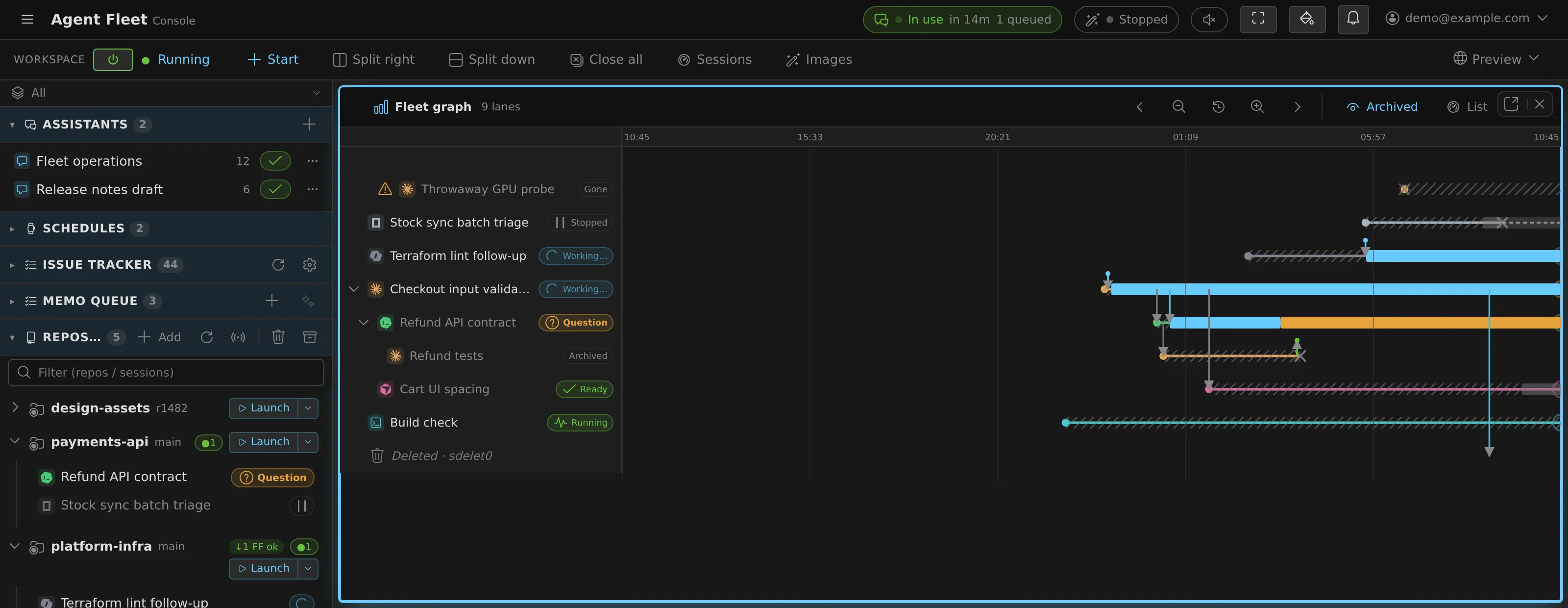
Fleet graph
One lane per session on a time axis, children under their parent, and an arrow for every start, handoff, instruction and message.
-
A second opinion on the plan
From a plan waiting for approval, “Review in another session” lets you pick a different agent and model to review it.
-
Fleet Operator
A built-in assistant that starts, instructs, stops and resumes sessions for you — and asks before starting anything that uses resources.
-
Session reports and Autopilot Off by default
Sessions report to the operator when they go idle, ask something or exit abnormally. With Autopilot on it answers routine questions itself — 10 unattended replies by default, 50 at most.
-
Handoff
Carry a conversation over to another agent. The operator drafts the summary, and you confirm it before anything starts.
Reading and editing files
The file viewer opens what agents write and what your team keeps — without leaving the Console.
-
Code
Highlighting for about 30 languages, change bars on lines git sees as modified, and a minimap up to 10,000 lines.
-
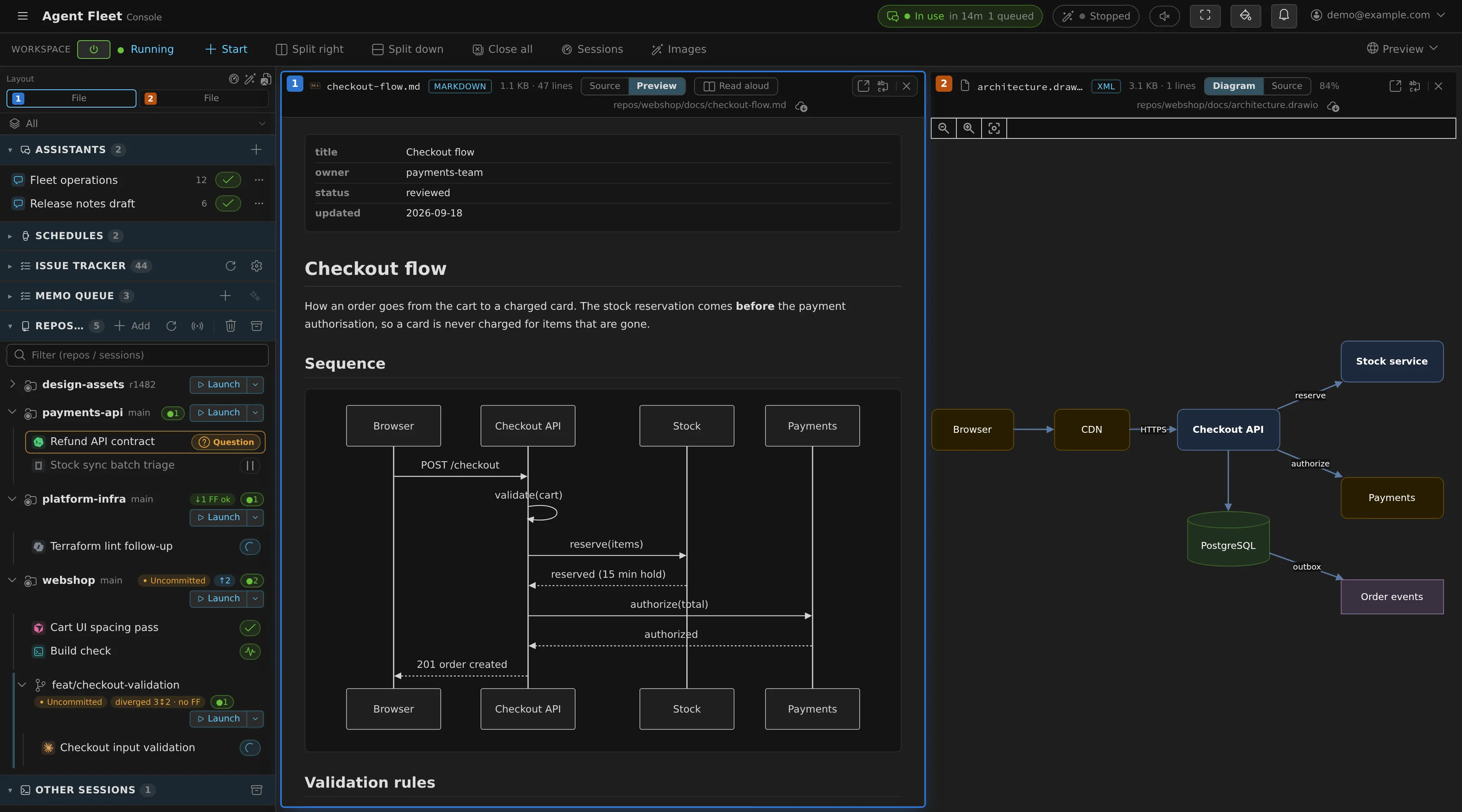
Markdown and Mermaid
Mermaid diagrams render in place, front matter shows as a property list, and
path:linelinks open the file at that line. -
Marp slides
A Markdown file with
marp: trueopens as a slide deck. -
draw.io diagrams
Rendered with no network access. Viewing only: you can edit the XML, not the drawing.
-
PDF
Text selection and zoom. Japanese PDFs without embedded fonts render too.
-
Office, ODF and EPUB
Word, Excel, PowerPoint, OpenDocument and EPUB, converted to Markdown in your browser, up to 40 MB. A plain preview: layout, shapes and images are not reproduced.
-
Images and the gallery
PNG to AVIF and SVG, zoomable to 8×. A gallery pane collects pictures; a generated one's settings are one click away.
-
Editing, with AI proposals
Save conflicts are detected, and an AI's proposed change is shown as a diff before you apply it (2 MiB per change).
-
Not supported (yet)
Math (KaTeX), CSV as a table, Jupyter notebooks, and video or audio. These open as text, or not at all.
Where work comes in
Tickets, pull requests, notes to self and schedules — each can start a session.
-
One inbox for three trackers
GitHub issues and pull requests, Jira issues and Bitbucket pull requests in one list, refreshed about every 5 minutes.
-
CI and conflicts at a glance
Open GitHub pull requests carry CI and conflict marks in the list; a pull request's details show CI, conflicts, reviews and diff size.
-
Branch named for the ticket
Starting from an issue fills in the branch name and its base from your naming rules.
-
Review from a pull request
“Start review” checks out the pull request's own head branch in a new worktree.
-
Memo queue
Jot a note on your phone and send it to a session from your desk: memos belong to you, not to a device. An assistant can sort them.
-
Scheduled runs
Tell the Fleet Operator “every night at 2:00, …”. The schedule wakes a stopped workspace to run it.
Git, in the Console
Real git per working copy and worktree, with the housekeeping that parallel work needs.
-
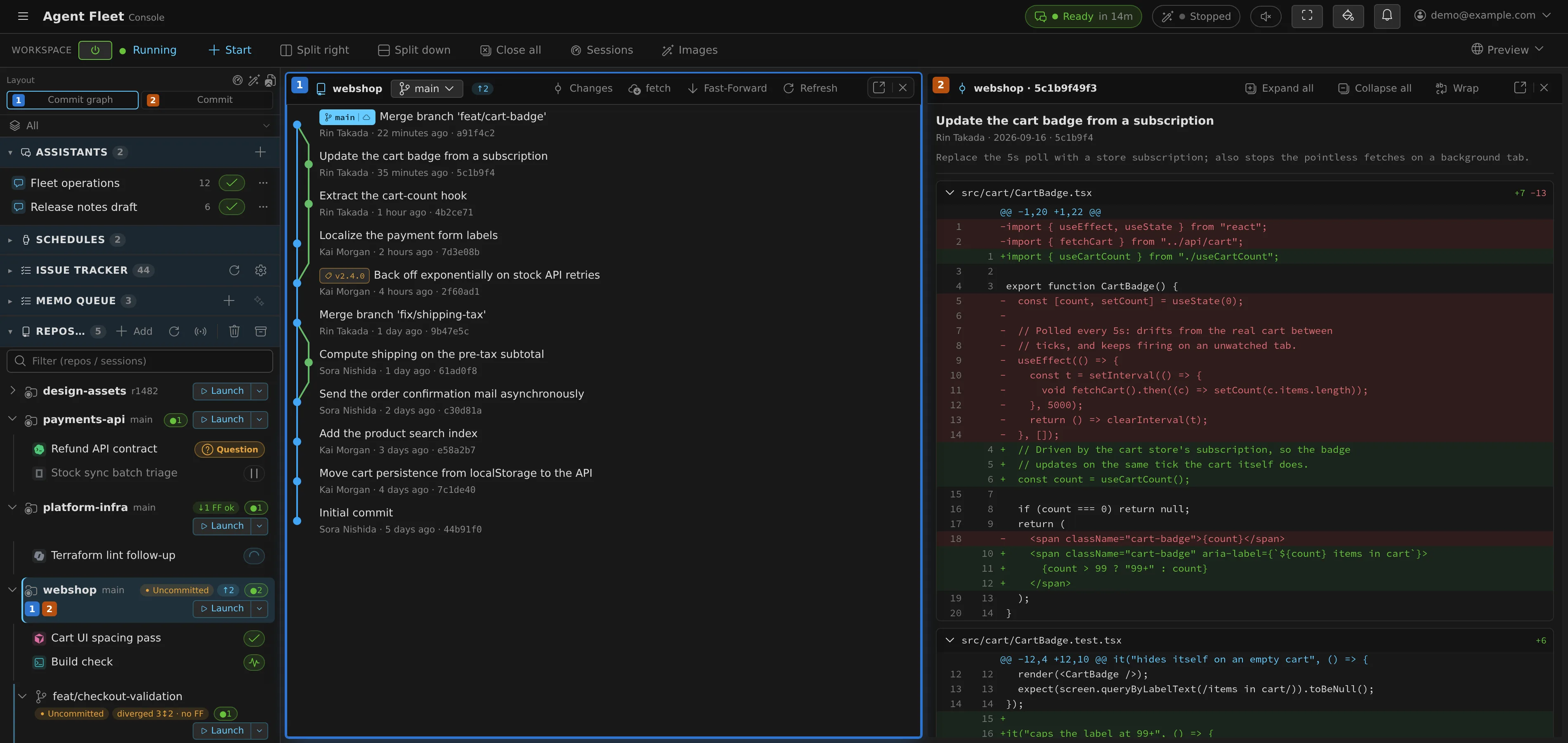
Commit graph
Branch lanes and diffs, staging and commit, and the graphs of submodules.
-
Worktrees against their parent
Each worktree shows where it stands against its parent — even, unmerged, fast-forwardable or diverged — with a one-click fast-forward.
-
Restore from the trash
Deleting a worktree keeps its commit, branch and uncommitted changes. Restoring puts it back at the same path, sessions included.
-
Built-in git hosting
Internal repositories with Git LFS, shared within your tenant. An administrator sets how many and how much LFS storage.
-
Submodules and LFS
Submodules are fetched with the clone, and SSH URLs are rewritten to HTTPS so they authenticate.
-
Git Flow
Initialize Git Flow for a repository from its row. It writes the configuration only — no commit, no checkout.
-
Subversion
Check out SVN repositories too, with saved credentials. No worktrees or commit graph there.
A development environment around the agent
Databases, a browser and previews inside the workspace, with no Docker required.
-
Databases per working copy
Postgres or MySQL 8.4 for each working copy, with no Docker. The server stops after 30 idle minutes.
-
Browser pane
Your dev server in a real browser inside the Console — HMR, WebSockets and cookies work. 2 per workspace, on desktop and tablet.
-
Preview URLs AWS only
A URL per port that you can show to your tenant, or open without sign-in for a while. Issued only where the deployment provides preview subdomains.
-
Hand the browser to a person
When an agent reaches a one-time code, it hands you the page. You type the code and press “Action complete”.
-
A real terminal
Every session, agent or plain shell, is attachable as a live PTY — with a control-key row on phones.
Chat and assistants
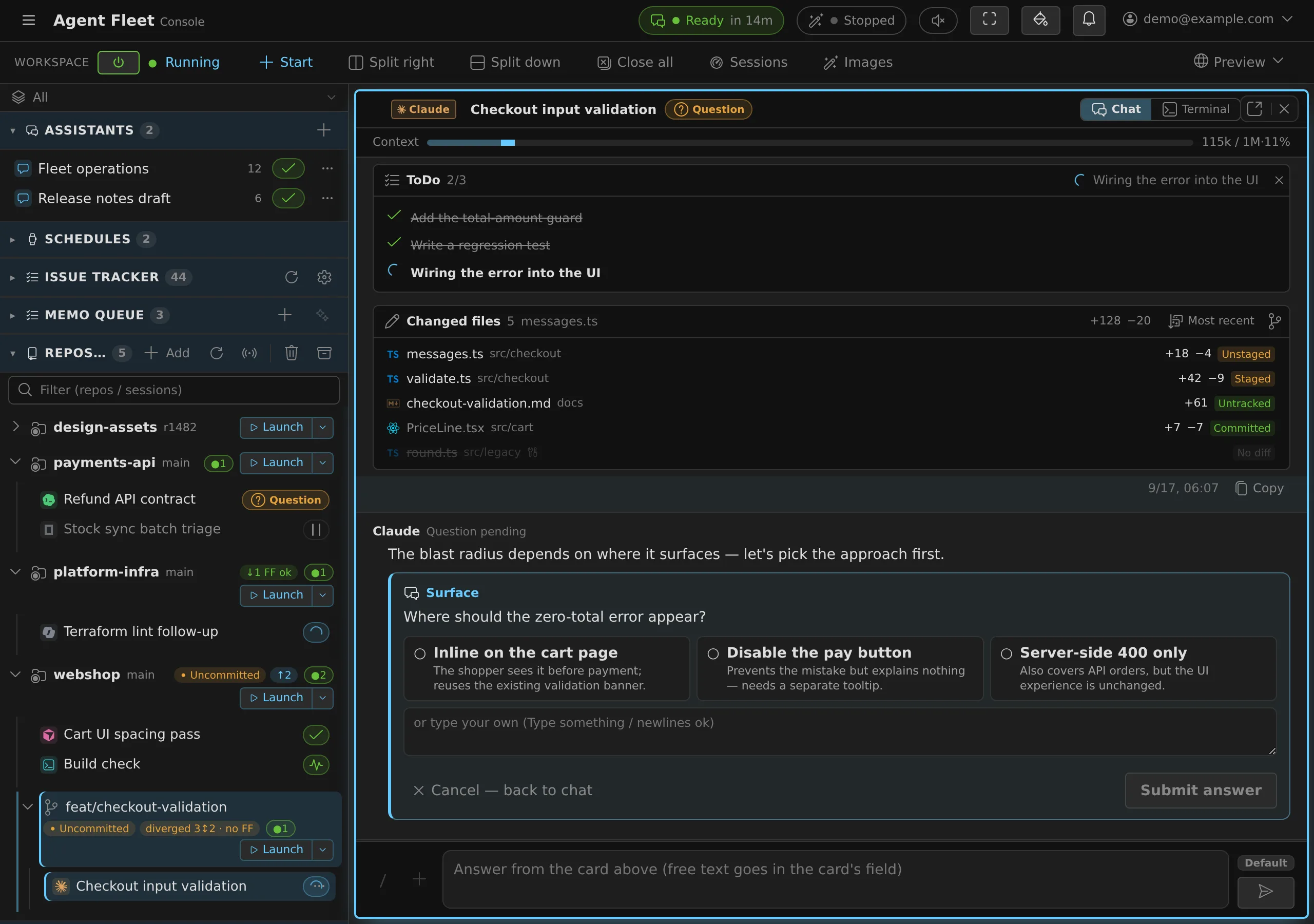
Assistants you shape yourself, and help reading and answering the agents.
-
Your own assistants
Give an assistant a persona, an agent and model, and a tool permission: none, read or write access to Agent Fleet.
-
Translation without a turn
“Translate” reads an agent's answer in your language through one model call outside the session.
-
Reply suggestions
Chips learned from your own messages, with no AI involved. ✨ asks an AI, and spends tokens only when pressed.
-
A work plan that survives compaction
Compact a long assistant chat — automatically above 90% — and the work plan is carried over word for word.
-
Branch from a message
Fork a conversation from one of your earlier messages, and try another direction without losing the first.
-
Switch the agent mid-conversation
Move an assistant chat to another agent or model and keep the conversation.
-
Slack and Discord Off by default
Each session gets its own thread. With “Reply to steer” on, you answer there — with buttons.
Operations and SRE
Read your monitoring from a chat, and run AWS commands as yourself.
-
SRE assistant Experimental
Reads PagerDuty, Grafana, CloudWatch and AWS. Read-only: it cannot start sessions, and alerts do not arrive on their own — you ask.
-
AWS tools, read-only first
The Agent Toolkit for AWS starts read-only. Write tools are a separate switch, and they can change real resources.
-
AWS commands run only in the account you name
af-aws-execruns a command as your profile and refuses unless it belongs to the account you name — so nothing falls back to the workspace's own role. -
SSM login
Reach in-house hosts through SSM Session Manager, signing in with IAM Identity Center. No AWS secrets are stored in Agent Fleet.
MCP
Bring your own tools to the agents, and drive Agent Fleet from outside.
-
Your MCP servers
Register stdio or remote HTTP servers, with secrets stored encrypted. Attach them to sessions and to the assistants you create.
-
Drive it from an external Claude
Operate your workspace from Claude Code or Claude Desktop with an MCP token: read, write or admin scope, expiring after 90 days by default, revocable.
-
Distribute to the tenant
A tenant administrator hands a remote MCP server to everyone in the tenant at once.
-
Outbound control
The deployment's operator can log or enforce outbound MCP traffic against an allowlist; members request access from Settings.
Image generation and your own engines
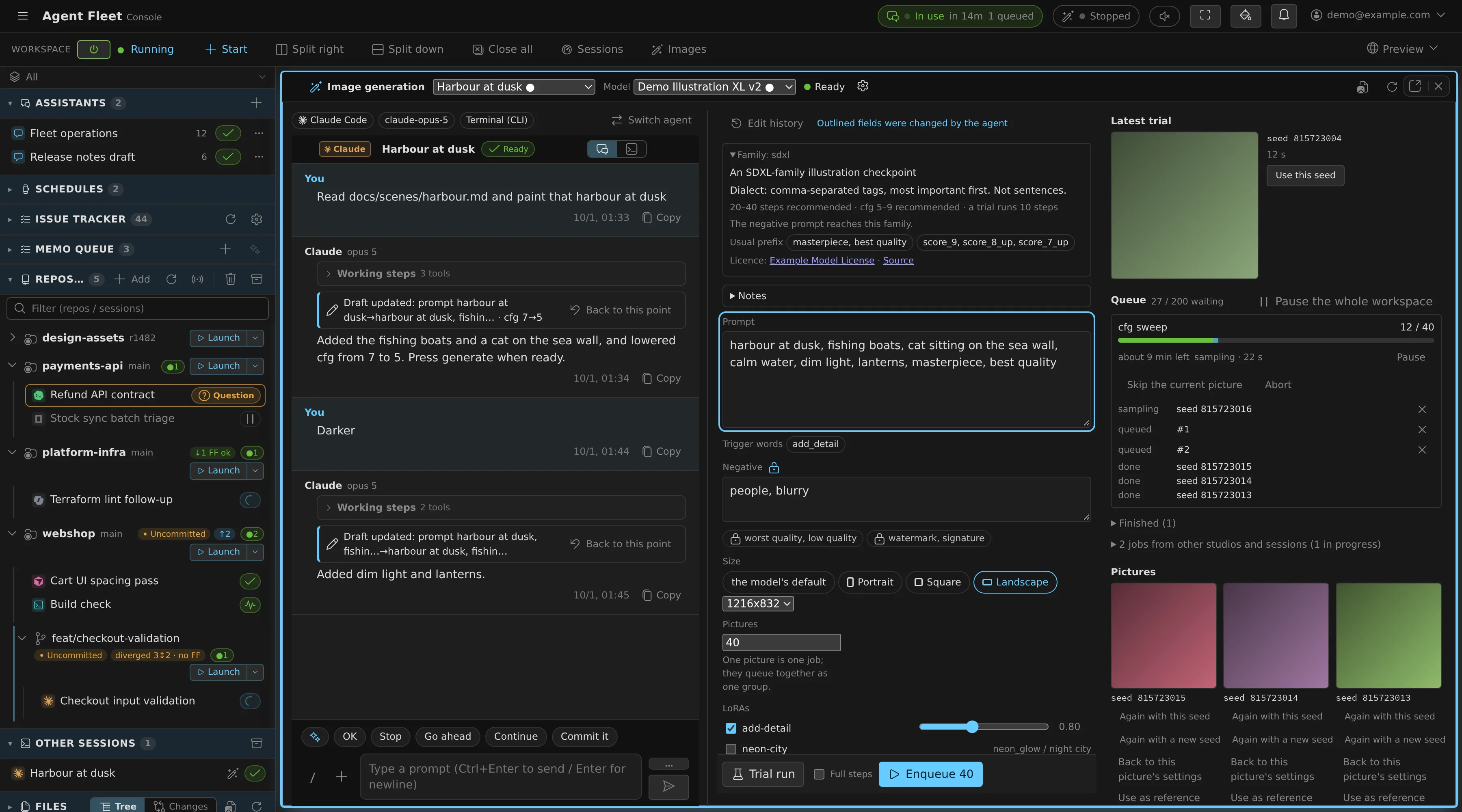
Where an administrator has set up an engine, generate pictures and run open models inside the deployment.
-
The studio
Talk to an agent to refine the draft. It may trial the exact draft on screen, one picture at a time; you press the button for the batch. Every edit is in the history, and you can go back.
-
ComfyUI engines
Point the deployment at your own ComfyUI on the network, or run GPU engines on AWS. An administrator registers them.
-
A GPU only when it is needed AWS only
On the
ecs-ec2edition, a GPU instance starts when a job asks for it and stops once it idles. The first request waits about 3 minutes. -
llama.cpp sessions
Run open models such as Qwen3, GPT-OSS and Gemma as a session of their own, with no sign-in. A cold first turn takes minutes.
-
Pictures from any session Off by default
Let sessions call the image generator as a tool.
Keyboard, phone and voice
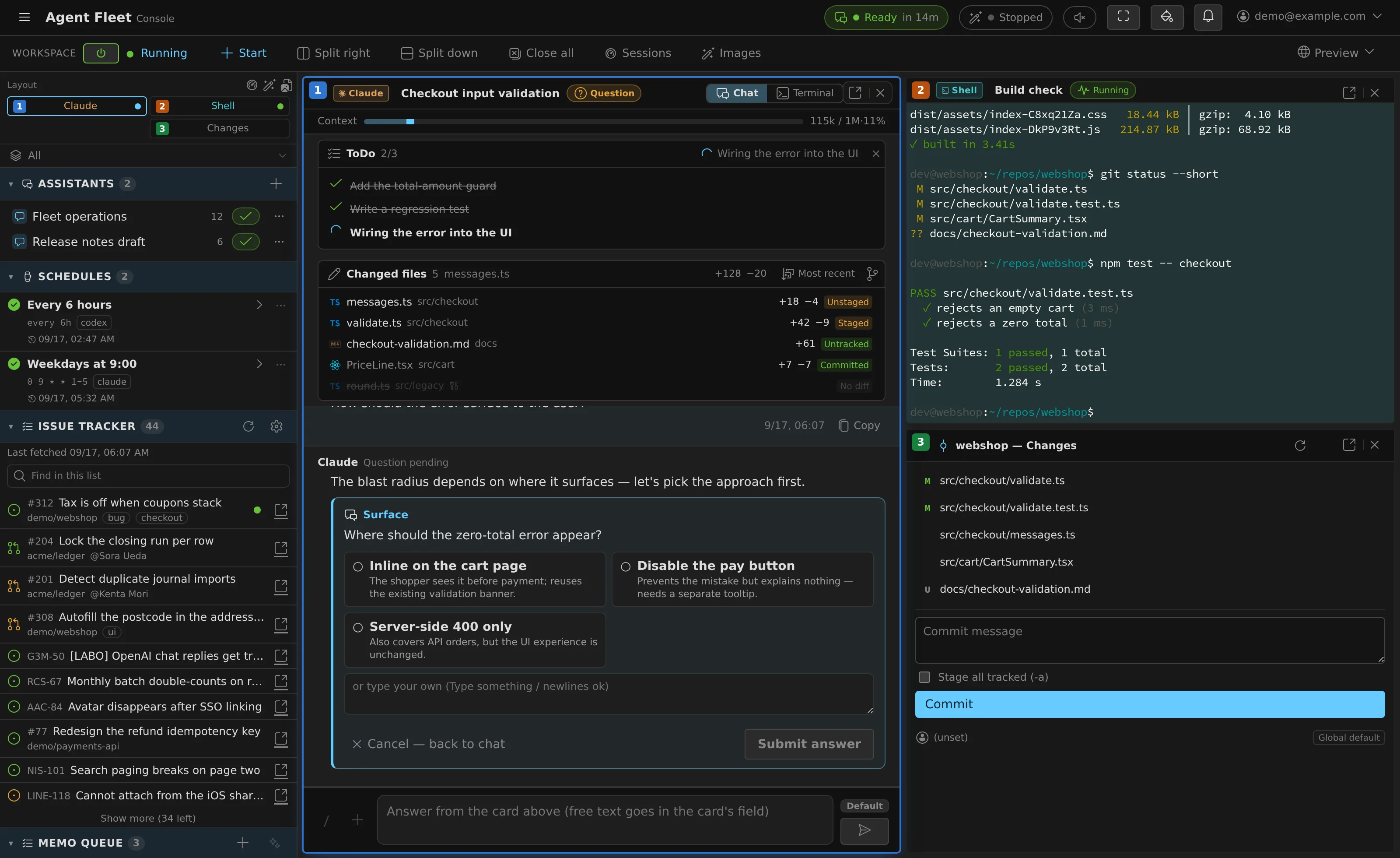
Move through the fleet without the mouse, from a phone, or by ear.
-
Command palette
Ctrl/⌘ P finds sessions, commands, changed files and files — sessions waiting on you first.
-
Leader key
Ctrl/⌘ K opens a command menu of short key sequences.
-
Next thing that needs you
Alt U jumps to the next session waiting on your answer, then to unread notifications.
-
Panes
Up to 4 × 2 panes side by side; any pane pops out into its own browser tab.
-
On a phone
Swipe left and right through the running sessions. A row of control keys — Esc, Tab, arrows, ^C — sits under the terminal.
-
Read aloud Off by default
Answers read out in a voice per session, placed left or right to match its pane. Zundamon (VOICEVOX, started by an administrator) or Amazon Polly.
Governance and administration
Rules that reach every agent, and controls an administrator can hold.
-
Three layers of instructions
The fleet policy from the operator, your own agent instructions, and each repository's
CLAUDE.md/AGENTS.md— delivered in each CLI's own idiom. -
Agent memory snapshots
What Claude Code and Codex remember on their own is snapshotted after each run. Roll it back — and undo the rollback.
-
Models you don't use
Hide the models your plan bills extra for: they leave the pickers, and launches naming them are refused.
-
Audit log
Changes are recorded; terminal input and output are not stored.
-
Per-member limits
Concurrent sessions, and each member's workspace size: memory, CPU and disk.
-
Allowed networks
Limit a tenant to IPv4 and IPv6 ranges you list.
-
A tenant's own sign-in
A tenant can bring its own OIDC provider or GitHub organization, once the deployment's administrator approves it.
Usage and cost
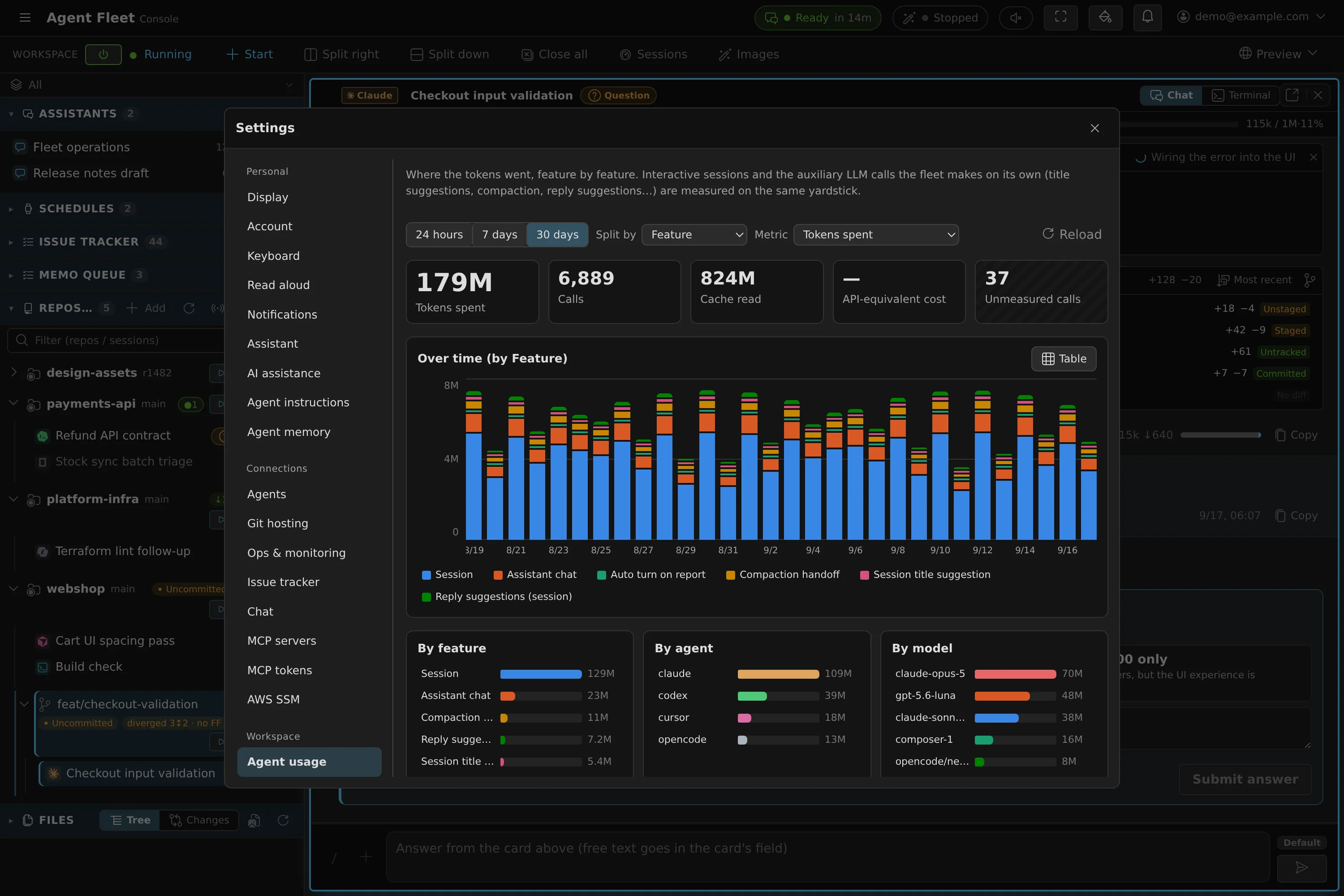
Know what the fleet uses before the bill, or the limit, tells you.
-
Tokens by feature, agent and model
Over 24 hours, 7 or 30 days. Calls that report no tokens count as unmeasured, never as free.
-
API-equivalent cost
Tokens priced at the published API list price — an estimate, not what a flat subscription bills you.
-
Plan limits on the top bar
How much of each plan's limit is used, for Claude, Codex, Copilot, Antigravity and Muse Code.
-
Resume after a limit
A turn cut short by a usage limit picks up again once the limit resets — for Claude, and for Codex when Managed.
-
Cloud cost per workspace AWS only
The cost directly attributable to each workspace, about a day behind.
-
Running-time heatmap
Hours of the day against dates, coloured by time running or by session count.
Try it on your own machine
The native edition needs x86_64 Linux or WSL2 and no Docker.