
Control outbound traffic
Observe the traffic from workspaces to the internet, grow an allowlist, and narrow it to the destinations you allowed. A forward proxy decides by the destination’s name (CONNECT and SNI) and does not decrypt TLS. Only the deployment administrator (super_admin) can operate it.
How it works
Section titled “How it works”| What you do | What Agent Fleet does |
|---|---|
| Stay in log-only and observe for a while | Lets everything through and counts each destination under “Observed destinations” |
| Add legitimate destinations to the allowlist | Versions the allowlist and delivers it to the workspaces’ proxy |
| Approve or reject members’ requests | Shows a destination an MCP server registration cannot reach as a request under “Proposed (needs approval)” |
| Switch to enforce | Blocks destinations not on the allowlist |
Going in stages is the core of the design. Switching straight to enforce also blocks traffic you need, such as agent updates and MCP endpoints.
Open the screen
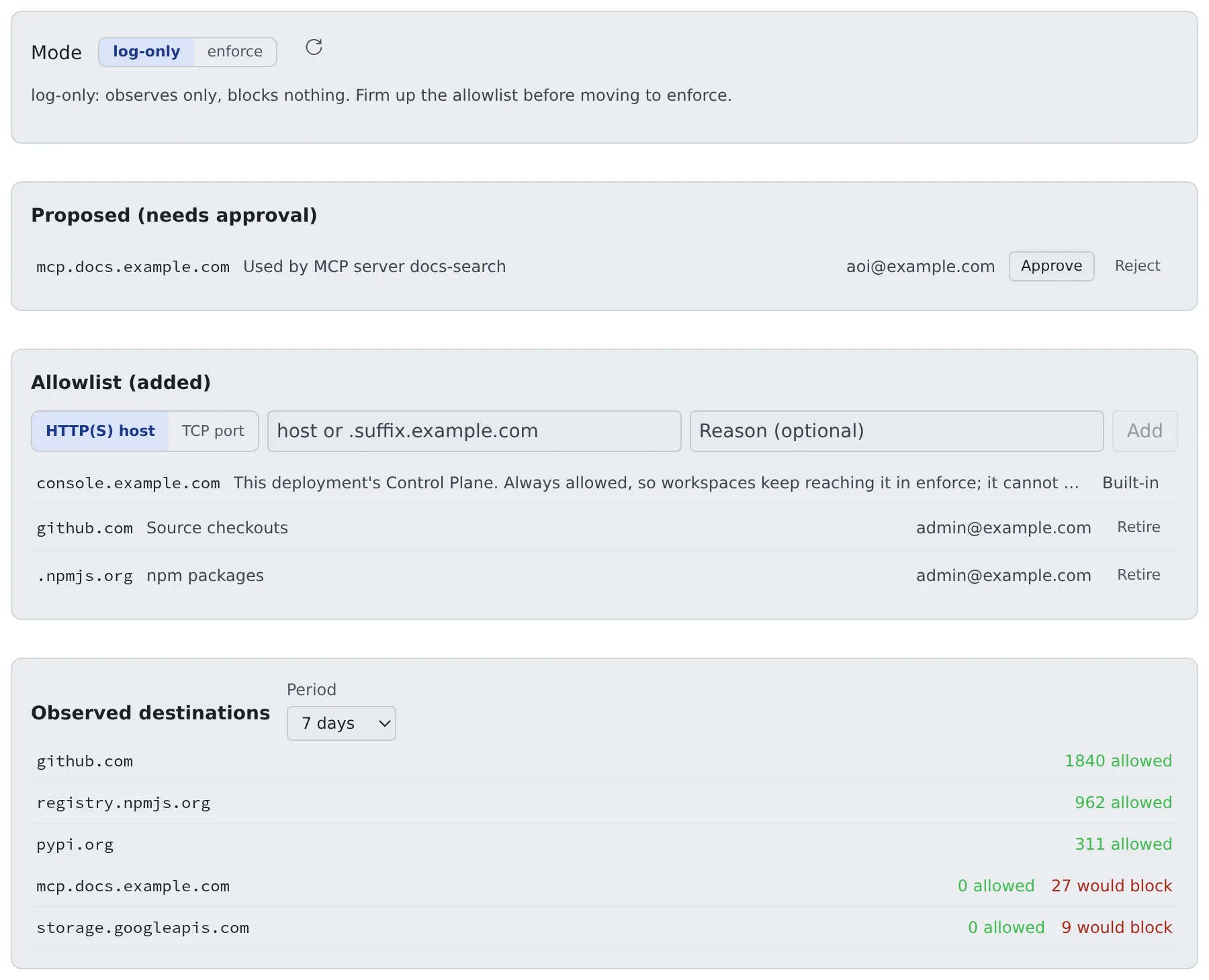
Section titled “Open the screen”Open Admin → Deployment → Egress. From the top: the mode, Proposed (needs approval), Allowlist (added), and Observed destinations.
1. Observe in log-only
Section titled “1. Observe in log-only”The default mode is log-only. Nothing is blocked; destinations are recorded, and “Observed destinations” shows an “allowed” and a “would block” count per host. Start here to learn what goes where. The period can be 1 day, 7 days or 30 days.
The counts are approximate.
- A report re-sent after a timeout can be counted twice
- While the Control Plane is unreachable, the proxy holds up to 5000 destinations; the overflow appears as
egress.droppedin the audit log - Restarting the proxy loses what it held in memory
A host missing from the list was not seen, which is not the same as not used. Before you switch to enforce, check the audit log for egress.dropped.
2. Firm up the allowlist
Section titled “2. Firm up the allowlist”While you watch the observations, add legitimate destinations under “Allowlist (added)”.
- Choose HTTP(S) host and enter it as
hostor.suffix.example.com - Add a reason if you like, and press Add
- Remove an entry you no longer need with Retire
The allowlist is versioned, and each entry is active, proposed or retired. AI only proposes; a person approves.
Destinations allowed from the start
Section titled “Destinations allowed from the start”| Destination | Treatment |
|---|---|
| The product defaults | The sources of the workspace’s own installers (JDK, Node.js, Go, gcloud, MySQL, Postgres, Chromium) and of the agent CLIs installed and updated at start (Claude, Cursor, Kiro, muse, Antigravity). They apply with no added entries, so Settings › Toolchains and the install at start keep working in enforce |
| This deployment’s Control Plane | The host of the public URL and, when set, the internal URL. Shown as “Built-in” and cannot be retired, because workspaces reach the Control Plane through the egress path |
storage.googleapis.comis not in the defaults: it is general-purpose storage anyone can upload to. Add it when a workspace uses Antigravity (it downloads from there on first install and every update) or installs Chromium on x64- A built-in entry allows the whole host (any port, any path). Give the Control Plane a host name it shares with no other service
- A built-in entry does not lift the gateway’s other refusals (other ports, internal addresses)
When the Control Plane’s URL is an IPv6 address (https://[2001:db8::5]):
- It reaches the gateway as a lower-case, compressed address, both with and without brackets
- Zone IDs, IPv4-mapped and IPv4-compatible addresses, and loopback, link-local and multicast addresses are not allowed; the Control Plane logs a warning at start
- Whether the Control Plane is actually reached over IPv6 has not been checked yet; confirm that workspaces reach it
- The entries you add yourself are host names and
.suffixonly; you cannot add an IPv6 address by hand
Allow a non-HTTP destination (AWS egress gateway only)
Section titled “Allow a non-HTTP destination (AWS egress gateway only)”Git over SSH and databases are not HTTP, so a host entry does not let them through. Choose TCP port and enter the host and the port.
| Field | Example |
|---|---|
| Host | A full host name or one public IPv4 address (git.example.com, 203.0.113.7). No wildcards and no .suffix |
| Port | One port (22) or a range (11000-11999). A range is at most 2048 ports. 53, 80, 443, 853 and 3128 are refused |
- In enforce, a destination with no TCP entry is dropped; in log-only it passes and is recorded as would-block
- Approving opens non-HTTP access to that port of that host from every workspace. The gateway passes only that port, on the addresses the host resolves to
- Let the gateway’s egress address through the destination’s firewall first
Settings and limits are in “Egress gateway” in the ECS runbook.
Approve members’ requests
Section titled “Approve members’ requests”When a server a member registers under Settings > Connections > MCP servers (used by sessions) points at a destination not on the allowlist, the member can request it right there.
- A request appears under “Proposed (needs approval)” with the destination, the reason and who asked
- Approve adds it to the allowlist; Reject turns it down
- Until you decide, the member’s screen says the host is awaiting an administrator’s approval
- A TCP request carries a note on what approving it opens
3. Switch to enforce
Section titled “3. Switch to enforce”Once the allowlist is settled, set the mode to enforce. From then on, destinations not on the allowlist are blocked.
- Clearing the would-block entries in “Observed destinations” while still in log-only makes the switch smooth
- Check the audit log for
egress.droppedbefore switching (1. Observe in log-only)
What it can hold
Section titled “What it can hold”Setting AF_EGRESS_PROXY_ADDR on the Control Plane gives every workspace http_proxy, https_proxy and no_proxy (and their upper-case twins). It is off by default.
Programs that honour those variables go through the proxy; a process that ignores them goes straight out.
| Deployment | Does enforce hold? |
|---|---|
AWS (ecs, ecs-ec2) with EgressRoute=gateway in 00-network |
Yes. The workspaces’ route table goes through the egress gateway, and there is no other way out |
| Everything else | No. A network or security-group rule that leaves the proxy as the only way out is not provided yet. You can run it up to observing and growing the allowlist |
- The egress gateway is new and has been checked on a test deployment only; it is not in production use yet (Choose where to deploy)
- The gateway decides by the name the client sends (the HTTP Host, the TLS SNI). Its other limits are in
SECURITY.md - The Control Plane’s internal address (
AF_CP_INTERNAL_URL) is excluded from the proxy on docker, Kubernetes, ecs and ecs-ec2 - On ecs and ecs-ec2 the proxy refuses link-local destinations, so the task and instance metadata addresses (
169.254.170.2,169.254.169.254) are excluded too
Keep the records
Section titled “Keep the records”Where the egress gateway records connections (EgressRoute=gateway on AWS), a record of each connection tied to its workspace is kept as well.
The screen shows only the per-host counts; the per-connection records are read from GET /api/admin/egress/events (super_admin).
| Setting | Effect |
|---|---|
AF_EGRESS_EVENT_RETENTION_DAYS |
How many days per-connection records are kept. The default is 30; 0 keeps them forever. The per-host counts stay |
AF_EGRESS_ARCHIVE_URL |
Where each past UTC day is saved before it is deleted: s3://bucket/prefix, gs://bucket/prefix or file:///dir. Empty by default (nothing saved) |
How to prepare the store depends on the target.
- AWS: use the data stack’s
EgressArchiveparameter - GKE:
egress_archive = trueindeploy/gcp/gkecreates a private bucket (egress_archive_existing_bucketfor an existing one). The line forcp.envis the Terraform outputegress_archive_env; it replaces the existing line rather than being appended - Give the Control Plane’s Google service account
roles/storage.objectCreatorandroles/storage.objectVieweron that bucket only. Without the viewer role the Control Plane cannot verify a day it wrote, and the purge stops at that day - Objects in the GKE bucket never expire unless you set
egress_archive_retention_days
Related
Section titled “Related”- Operate MCP and external-connection sign-in: how MCP server registration meets the allowlist
- Distribute an MCP server to everyone: the tenant administrator’s side
- Choose where to deploy: the egress route on AWS
- ECS runbook: configuring the egress gateway
For agents
Send this prompt to your agent to read this page.
Read https://agent-fleet.org/docs/operate/secure/egress/index.md