
Read the audit log
See when, who, against what and what kind of change was made inside your tenant. The trail of operations that cannot be undone, such as offboarding a member or destroying a workspace, is here too.
How it works
Section titled “How it works”| What you do | What happens |
|---|---|
| Open “Audit” in Tenant settings | The tenant’s change records are listed, newest first |
| Type an action, target or user into the search box | The rows shown are filtered |
| Press the refresh button | The latest records are read again |
You see your own tenant’s records only. Other tenants and the deployment as a whole are the deployment administrator’s to read.
Open the audit log
Section titled “Open the audit log”- Open Tenant settings from the account menu at the top right
- Under Operations on the left, choose Audit
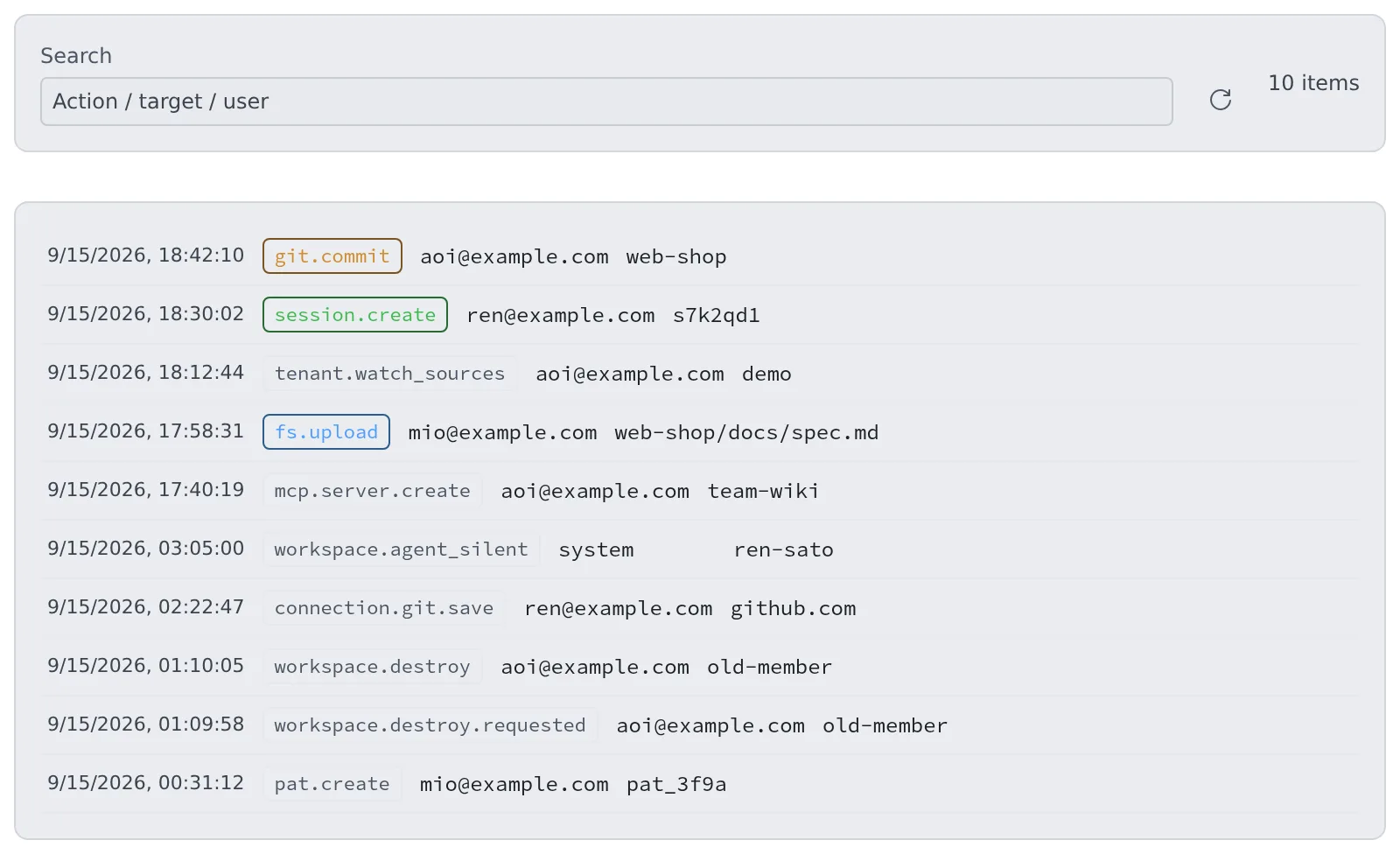
One row is one operation.
| Column | Contents |
|---|---|
| Time | When the operation happened |
| Action | What was done (git.commit, session.create and so on) |
| Actor | Who did it. An email address, or an outside MCP client, or the system itself (auto-stop and the like) |
| Target | Which file, repository, session or member it was done to |
- The screen shows the newest 200 rows. The search filters within those 200
- It does not refresh by itself. Press the refresh button to see the latest
- The detail of a result (what was removed, the error) is not on the screen. The
tail_audittool, from an MCP client connected as a tenant administrator, reads up to 500 rows with their details
What is recorded
Section titled “What is recorded”Only operations that change state are recorded.
| Action prefix | What is recorded |
|---|---|
fs.* |
File uploads, creation, renames and deletes |
git.* |
Commits, checkouts, fetches and so on |
repo.* |
Repository clones, creation and deletes, and the delete lock (repo.lock) |
session.* |
Session creation, fork, delete, move and sharing, the spend cap (session.spend_cap) and the delete lock (session.lock) |
connection.* |
Credentials saved, deleted and signed in. A sign-in is one row, from the call that completed it |
mcp.* |
MCP servers created, updated, deleted, and their secrets (personal registrations and tenant distributions), and outside apps’ OAuth connections |
inbox.* |
Inbox requests sent, taken, declined, done and so on. The body is not kept |
membership.*, member.* |
Members added and removed, roles, limits |
tenant.*, limit_board.set |
Tenant settings changes (tenant.external_memory, tenant.watch_sources and so on) |
pat.* |
Tokens issued in this tenant, created and revoked |
workspace.* |
Workspaces stopped, cleaned and destroyed; an Agent that stopped answering, came back, or was stopped by the auto-stop |
- No secret value is written. A credential row’s target is only the Git host, the variable name or the MCP server ID
- A write the workspace answered with an error leaves no row
- When a tenant or deployment administrator changes tenant settings, the row lands under that tenant
What is not recorded
Section titled “What is not recorded”- Reads. Opening a file to look at it, or browsing a list, leaves nothing
- Terminal input and output. The characters that scroll past are not stored, because passwords and tokens end up in them
So you cannot trace what a member typed in a terminal. You can trace when, who, against what and what kind of change.
Operations that cannot be undone leave two rows
Section titled “Operations that cannot be undone leave two rows”For the operations below, a <action>.requested row (for example workspace.destroy.requested) is written before the operation runs, and a second <action> row when it ends.
- Cleaning a home, deleting a home’s backups, destroying a workspace
- Removing a member, deleting a member for good, deleting a tenant
- Terminating a pool slot, purging an inference engine model’s files
- Deleting a tenant sign-in method, deleting and renaming a built-in repository
| What you see | What it means |
|---|---|
A result row after .requested |
The operation ended. What it did and what it could not remove is in the result row’s detail |
.requested with no result row |
The record of the result was lost. That does not mean nothing happened: check the target |
| The operation was refused with “the audit log could not record who asked for it” | Nothing was done. Try again once the database is back |
Q. Can I see other tenants’ records? No. Members, sessions, audit and running time are all limited to your own tenant. Only the deployment administrator sees the whole deployment.
Q. Can I see the commands a member typed in a terminal? No. Terminal input and output is not stored. What you can trace is the kind, actor, target and time of changes to files, Git, sessions and the like.
Related
Section titled “Related”- Read running time and cloud cost: who used how much workspace time
- Roles — who may do what: what tenant and deployment administrators can do