
Update the native package
Move the native package to a new version. Getting the new version ready is automatic; switching to it happens when you restart, at a time that suits you.
How it works
Section titled “How it works”| What you do | What happens |
|---|---|
| Nothing (when the installer could enable the timer) | A daily timer runs af update, which fetches and verifies the new version and stages it beside the current one. Without the timer, you run af update yourself |
| Restart when it suits you | It switches to the new version. Running sessions are interrupted |
Write AF_VERSION to pin a version |
Automatic updates do not move past that version |
Data under WS_DATA is not touched. A new workspace image (rootfs) is fetched on the next start, if needed.
Stage a new version
Section titled “Stage a new version”af update fetches the latest release (or the AF_VERSION-pinned one), verifies its sha256, stages it beside the current version and re-points ~/.local/bin/af.
It never restarts a running Control Plane. The new version takes effect only when you restart, so live agent sessions are never dropped without your say-so.
af update --check # report whether a newer release exists (no download)af update # download + verify + stage the latest (or AF_VERSION-pinned)--yesskips the question whether to downloadaf updateworks only in the installer’s layout (the~/.local/bin/afsymlink). A hand-extracted copy is refused: use Replace it from a tar below
The daily timer
Section titled “The daily timer”The installer enables a user timer (agent-fleet-update.timer) that runs af update daily. It only stages; it does not switch.
- It is enabled only when
systemctlexists and the user systemd bus is reachable. When it is, the installer printsauto-update: daily 'af update' timer enabled - If that line did not appear (on WSL with systemd off, for instance), there is no timer: run
af updateabove yourself to update. How to turn systemd on in WSL is in Run it as a systemd service - Opt out at install time with
AF_NO_AUTOUPDATE=1 - To stop it later, or to see when it runs next:
systemctl --user disable --now agent-fleet-update.timer # stop auto-stagingsystemctl --user list-timers agent-fleet-update.timer # when it next runsSwitch to the staged version
Section titled “Switch to the staged version”Switching is a restart of the main service. Do it when it suits you, in either place.
| Where | What to do |
|---|---|
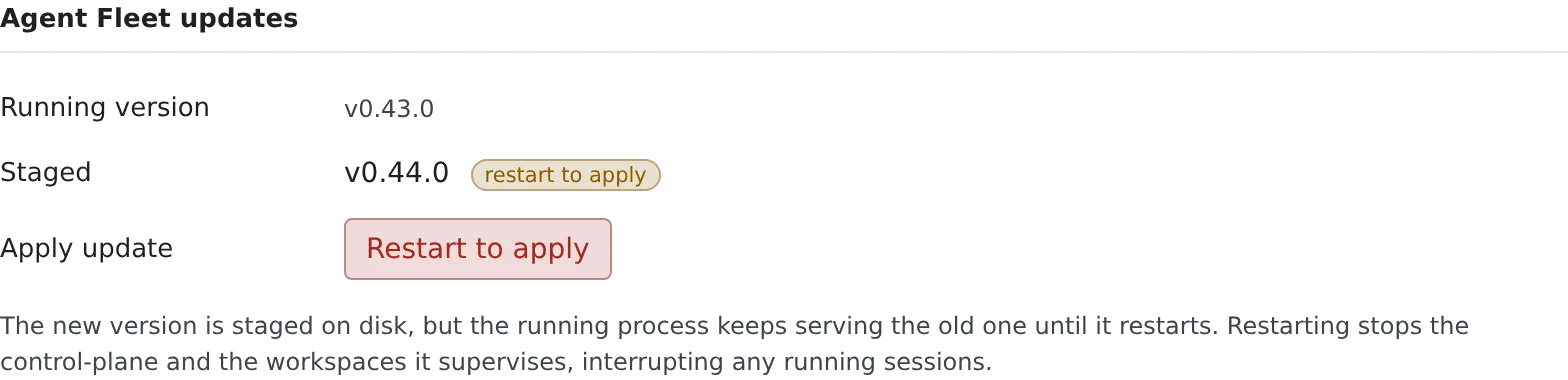
| The Console | When a new version is staged, Restart to apply appears in Agent Fleet updates under Settings → Toolchains. Before restarting it tells you how many sessions are running |
| A shell | systemctl --user restart agent-fleet. For a foreground run, Ctrl-C and af start |
Pin a version
Section titled “Pin a version”Write Environment=AF_VERSION=<v> in both the agent-fleet and the agent-fleet-update units.
af update then treats that version as the target and does nothing once you are on it. How to write the unit is in Run it as a systemd service.
Replace it from a tar
Section titled “Replace it from a tar”If you run a hand-extracted tar, extract the new version and start with the af inside it.
tar xzf agent-fleet-native-<v'>-linux-<arch>.tar.gz # extract the new versioncd agent-fleet-native-<v'>-linux-<arch> && ./af start- The data (
WS_DATA) lives outside the package and is used as it is - DB migrations run automatically at startup and only go forward. Downgrades are not supported. A tar backup of
WS_DATAbefore updating is recommended - Releases with the same rootfs version do not download it again
- Delete the old package directory once you no longer need it
Carry it in by hand
Section titled “Carry it in by hand”On a host that cannot reach the internet, carry the files in by hand.
| Way | What it does |
|---|---|
| Use the variant with the rootfs bundled | The -bundle tar built with --bundle-rootfs contains the rootfs and starts without any download |
| Pass a rootfs tar | With the regular variant, pass a rootfs tar fetched on another host with ./af start --rootfs <tar.zst>. The same sha256 verification applies |
- Only the first-time automatic install of the agent CLIs needs the network
- To have the CLIs fully offline, use a Docker target you built yourself from the repository’s Dockerfile with
BAKE_AGENT_CLIS=1. Licensing forbids redistributing builds with the CLIs baked in
Related
Section titled “Related”For agents
Send this prompt to your agent to read this page.
Read https://agent-fleet.org/docs/operate/native/update/index.md