
Have a session make images
Turn image generation on in Settings and a session makes pictures for you from a prompt. Use it for what text cannot carry: a rough sketch for a diagram, a stand-in picture for a mock-up, an illustration for a README.
How it works
Section titled “How it works”| What you do | What the agent does |
|---|---|
| Turn “Image generation” on in Settings | Gets the generate_image tool in sessions started from then on |
| Ask for what you want drawn | Writes the prompt and makes the picture with the first usable provider in your order |
| Name a provider (optional) | Makes it with that provider only |
| Look at the picture | Shows it as a card in the conversation, noting anything that did not come out as asked |
Before you start
Section titled “Before you start”- This deployment has an image engine, or you have connected the Codex or Antigravity CLI
- With no usable provider at all, the feature does not appear
Turn it on
Section titled “Turn it on”Turn on “Image generation” under ⚙ Settings → “Agents” → “Session”. It is off by default.
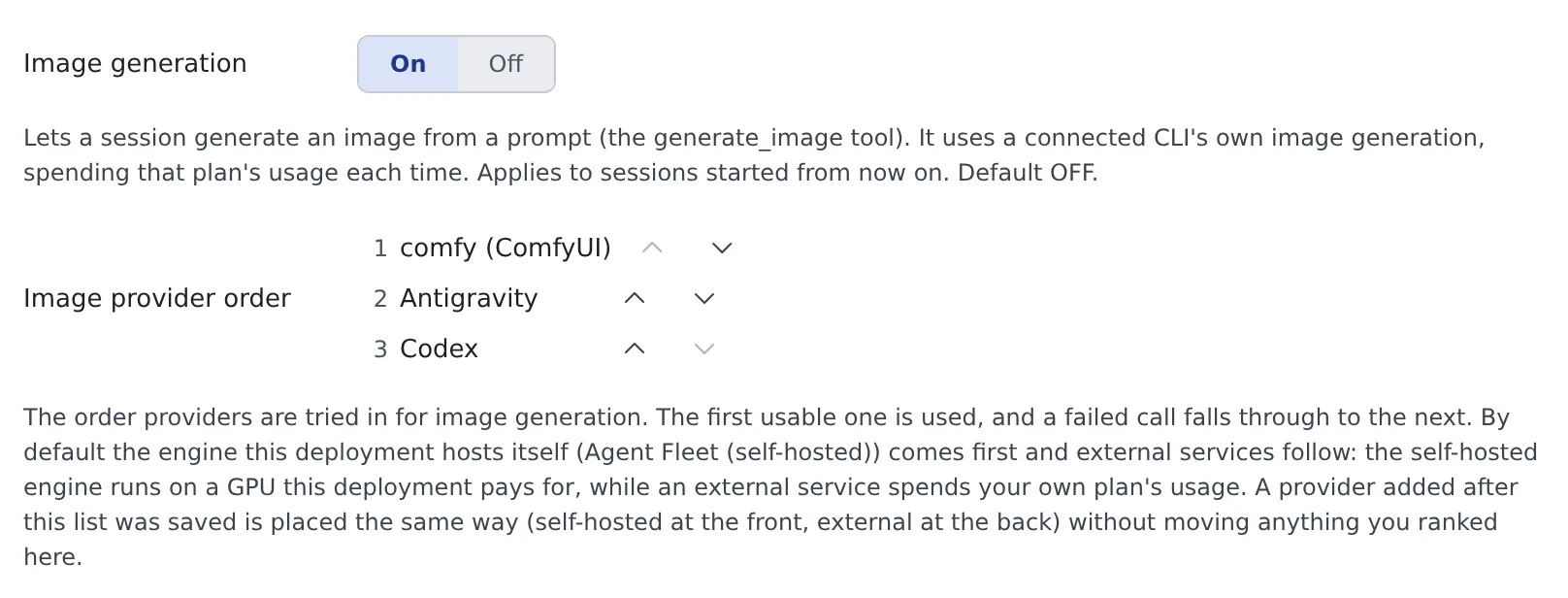
- It applies to sessions started from then on. A running session stays as it is until restarted
- When an administrator enables or disables a model or a LoRA, running sessions learn of it within about a minute; no restart is needed
Set the provider order
Section titled “Set the provider order”With it on, “Image provider order” appears. It lists the providers this workspace can use; reorder them with the arrows.
| Row | Provider | What it spends |
|---|---|---|
| The engine’s name (ComfyUI or OpenAI-compatible) | An engine this deployment runs itself | A GPU the deployment pays for. None of your plans |
| Antigravity | The Antigravity CLI | Your Gemini / Antigravity plan’s usage |
| Codex | The Codex CLI | Your ChatGPT plan’s usage |
- The first usable one is used. A failed call falls through to the next provider
- By default the deployment’s engines come first and external services after them
- A provider added later is placed the same way (deployment engines at the front, external services at the back) without moving anything you ranked
- While the workspace is stopped, only the default order is shown
Just ask as usual.
Make a rough sketch for this architecture diagram
Make a wide illustration for the top of the README. Use Codex
I want to compare the same prompt on the deployment’s engine and on Antigravity
- You can name a provider. Say “use Codex”, or a name shown in the order, and the agent picks that provider
- A named provider does not fall through to the next one when it fails, so a service you did not choose is never charged. If it is not ready, you get its own error (not logged in, for example)
- A comparison spends one picture’s worth on each provider
- Without a name, the order decides
Sessions that can use it
Section titled “Sessions that can use it”| Session | Providers it can use |
|---|---|
| claude, opencode and other sessions | Everything in the order |
| A codex session | All but Codex. Codex’s pictures come from codex’s built-in image generation |
| An agy session | All but Antigravity. Antigravity’s pictures come from agy’s own image generation |
| A session attached to a studio | None (Finish an image in the studio) |
A session’s own CLI is left out so the same tool is not started again and its usage paid twice. A session left with no usable provider does not get the tool at all.
What you can ask for
Section titled “What you can ask for”| Request | Deployment engine | Codex | Antigravity |
|---|---|---|---|
| Size | Yes | Passed on as a wish; a different size can come back | No exact size |
| Aspect ratio | Given through the size | No | 1:1, 2:3, 3:2, 3:4, 4:3, 9:16, 16:9 |
| steps, cfg, sampler, scheduler, seed, negative, LoRA strength | Yes | — | — |
| clip skip, guidance, shift | Yes, on a model of that family | — | — |
- Size, background and count are wishes, not guarantees. The agent is told what actually came back. When the finished size matters, check the picture yourself
- On a deployment engine, a field left out uses the model’s published value. A setting the model’s family does not read (cfg on FLUX.1, for example) is not silently dropped: the result names it as not applied
- When you ask for a LoRA, the tool gives the agent each adapter’s trigger words and asks it to put one in the prompt. A LoRA used without its trigger word is noted in the result
See the picture
Section titled “See the picture”- The picture appears as a card in the conversation. Click to enlarge it, or open it in a pane
- When something did not come out as asked, a note above the card says so, such as a size that differs from the one requested
- Cards appear in claude, opencode and GitHub Copilot sessions. In other sessions the agent gets the file’s path and no picture shows in the conversation
- Which provider made it is kept in the picture’s record
Pictures go into a folder per session and are deleted automatically after 30 days. Open them in the image gallery from “Generated images (N)” in the session’s right-click menu.
Use it more safely
Section titled “Use it more safely”- The prompt is sent to the provider (OpenAI, Google, or the deployment’s engine). Do not have pictures made from instructions that contain anything confidential
- To keep your plans’ usage untouched, put the deployment’s engine first, or ask the agent not to name a CLI provider
When it goes wrong
Section titled “When it goes wrong”The session has no image generation tool
Section titled “The session has no image generation tool”- The session started before you turned “Image generation” on. Restart it
- The session is attached to a studio. In a studio, pictures are made with the buttons
- The session has no usable provider: the deployment has no engine and no other CLI is connected
The picture came back at a different size
Section titled “The picture came back at a different size”On Codex and Antigravity the size is only passed on as a wish. The card’s note gives the actual size. To decide the size, have it made on the deployment’s engine.
A plan’s usage dropped more than expected
Section titled “A plan’s usage dropped more than expected”A CLI provider is being used. Put the deployment’s engine first in the order, or name it when you ask.
Related
Section titled “Related”- Generate images: make pictures in bulk without an agent
- Finish an image in the studio: refine the draft by talking to an agent
- Use the image gallery: look through the pictures sessions made