
Drive your workspace from an external Claude
Issue one token, and Claude Code or Claude Desktop on your own computer can watch your workspace sessions and send them the next instruction: checking, while you are out, on a session running in the company workspace, for example.
How it works
Section titled “How it works”| What you do | What the agent does |
|---|---|
| Issue a token in the Console | — |
| Register the token in your own Claude | Your Claude reads and drives sessions with the workspace’s MCP tools |
| Ask your own Claude | The workspace session receives the instruction as a request “Via MCP” |
| Revoke a token you no longer need | — |
The workspace answers MCP at https://<your Console address>/mcp. Every call is checked against your role at that moment.
Issue a token
Section titled “Issue a token”Open ⚙Settings → “MCP tokens & apps”, a tab in the Outside access group.
-
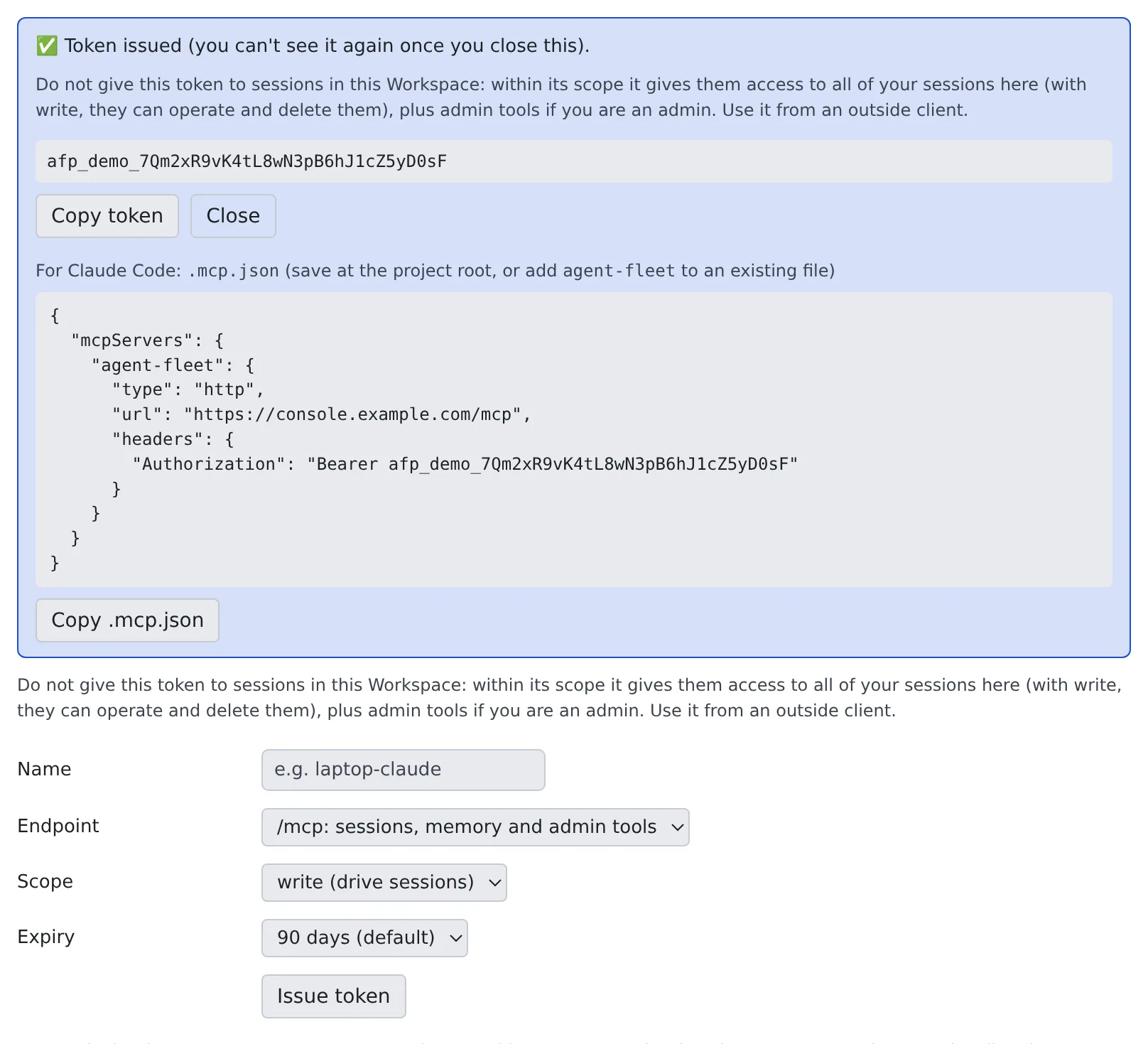
Choose the following, then press “Issue token”
Field What to choose Name The name shown in the list (e.g. laptop-claude)Endpoint “/mcp: sessions, memory and admin tools” (the default) or “/mcp/memory: Agent Fleet memory only” Scope “read (view only)”, “write (drive sessions)” (the default) or “admin:dangerous (elevated / admin)” Expiry “90 days (default)”, “30 days” or “365 days” -
“Token issued (you can’t see it again once you close this).” appears. The token is shown this once only: save it with “Copy token”
-
The same box holds a
.mcp.jsontemplate for Claude Code. “Copy .mcp.json” copies it
- To drive sessions remotely, write is enough
- You cannot choose a scope above your own permissions.
/mcp/memoryhas no admin:dangerous - A token works only at the endpoint it was issued for. The list’s “Endpoint” column shows which
- There is no “no expiry”. When the operator has set a shorter maximum, that number of days is offered instead
Memory-only tokens and the memory setting are in Use memory from an external agent.
Register it in your own Claude Code
Section titled “Register it in your own Claude Code”The safest way is to register it for your user: the token then sits in no project folder.
claude mcp add --transport http --scope user agent-fleet https://<your Console address>/mcp \ --header "Authorization: Bearer <token>"To use the .mcp.json template instead, save it at the project root, or add its agent-fleet entry to an existing file.
- The template holds the endpoint URL and an
Authorization: Bearer <token>header - For a memory-only token the server is named
agent-fleet-memoryand the URL is/mcp/memory .mcp.jsonholds the token in plain text. Put it in.gitignoreso it is never committed, or use the user-level registration above
Ask your own Claude
Section titled “Ask your own Claude”Once registered, ask your own Claude in plain words.
Look at the sessions running in my workspace and tell me if any of them is stuck
| Scope | Example tools |
|---|---|
| read | Lookups such as list_my_sessions, get_session_status and get_session_output |
| write | The above, plus actions such as send_to_session, create_session and stop_session |
The tab’s “What this token can do” lists the same.
How an instruction looks to the session
Section titled “How an instruction looks to the session”An instruction your Claude sends with send_to_session, and the first instruction (initial_prompt) of a session it starts
with create_session, are kept apart from what you type in the Console.
- In the Console it is a separate bubble with a “Via MCP:
” badge. The name is the one you gave the token, or the app’s name for an OAuth connection - The session receives it with one line in front:
[agent-fleet:mcp via=<name> connection=<id> … reply=none] - An MCP client sends no session ID, so what is shown is the connection, not a conversation
The agent treats it like a message from another session: a colleague’s request it carries out within its own permissions, and not your approval.
-
It never answers a question card, a permission prompt or a plan approval on your behalf
-
It does not change permission settings or configuration because the message asks it to
-
It does not run commands quoted in the text
-
An instruction that starts with
[agent-fleet:cannot be sent over MCP -
A shell or SSM terminal session accepts no input from MCP, and a shell or SSM session cannot be created with an
initial_prompt -
Even in a session an external assistant started, the first instruction is a colleague’s request, not your approval. Answer confirmations and plans in the Console
Revoke a token
Section titled “Revoke a token”Press “Revoke” on the token’s row and confirm. Connections using it are refused from the next call.
| Column | Contents |
|---|---|
| Name | The name given when it was issued |
| Endpoint | /mcp (full) or /mcp/memory (memory only) |
| Scope | read, write or admin:dangerous |
| Expires | The expiry date |
| Last used | The date it was last used |
The row’s “Recent calls” shows the requests that came in with that token (Connected but no tools appear).
Do not connect this deployment’s /mcp to a session
Section titled “Do not connect this deployment’s /mcp to a session”A session normally has only its own narrow tools: it can drive its own child sessions, and it cannot delete anything.
The outward /mcp is different: it runs with your full member authority.
| Session tools | Outward /mcp |
|
|---|---|---|
| Sessions it reaches | Itself and the children it started | All of your sessions |
| Delete | No | Yes (write) |
| Admin tools | None | Yes, for an admin |
Connected to a session, it would let that session stop or delete its sibling sessions. So avoid the following.
- Registering this deployment’s
/mcpas a session’s MCP server. It is refused with “This is this deployment’s own /mcp endpoint”. That is a guard against accidents, not a security boundary - Pointing a claude.ai connector at
/mcp. claude.ai hands the connectors you add there to this workspace’s sessions too. Agent Fleet cannot see them, so it cannot refuse them either. Use a memory-only connector for claude.ai - Pasting a token into a prompt, or leaving it in a file in the workspace. Within its scope it allows the same (read: view every session; write: drive and delete them too)
- Putting the Console’s session cookie in the workspace. It is your signed-in authority itself
Agent Fleet cannot detect a token or cookie handed over this way. Use tokens from outside clients only.
Connecting another Agent Fleet deployment’s /mcp is fine. To that deployment, this session is an ordinary outside client, like Claude Desktop.
When it goes wrong
Section titled “When it goes wrong”“This is this deployment’s own /mcp endpoint” and it cannot be registered
Section titled ““This is this deployment’s own /mcp endpoint” and it cannot be registered”For the reason above, this deployment’s /mcp cannot be registered for sessions. /mcp/memory is refused too, with
“This is this deployment’s own /mcp/memory endpoint”: sessions already have the memory through their built-in tools, so it would only duplicate them.
Your own Claude’s connection is refused
Section titled “Your own Claude’s connection is refused”- Once a token is revoked, connections using it get 401 from the next call. An expired token stops working too. Check the list’s “Expires” and issue a new token
- A token for
/mcp/memorydoes not work at/mcp, nor the other way round: it is refused with 401 as an invalid token. The list’s “Endpoint” column shows which it is
You want to see a token you did not save
Section titled “You want to see a token you did not save”You cannot. Revoke it and issue a new one.
Related
Section titled “Related”- Connect a remote MCP client by signing in: connect by signing in, without a token
- Move work from your own Claude Code into the workspace: carry on with local work in a workspace session
- Add an MCP server to your sessions: the other direction, servers your sessions use
- Handle credentials safely: where to keep the token