
Launch a session from a repository
Launch a session that works in a repository straight from its row under Repositories in the left pane. The row’s badges also tell you about unpushed changes and changes you have not brought in.
How it works
Section titled “How it works”| What you do | What the agent does |
|---|---|
| Use the row’s “Launch” to choose the agent, model, location and first prompt | Starts work from the first prompt, in a new worktree by default |
| Keep first prompts you use often as templates | — |
| Check the row’s badges for uncommitted work, unpushed commits and the gap to the parent | — |
Launch
Section titled “Launch”- Press “Launch” on the row. The “Start working” screen opens
- Choose the agent, model, location and first prompt
- Launch
- The location defaults to an isolated “New worktree”. What each location does, and the base branch and branch name, are in Work in parallel with worktrees
- The ▾ next to “Launch” lets you pick a kind (an agent or a shell) and launch at once without the screen. No prompt is passed
- In the ▾ list, Ctrl+click or middle-click launches into a new pane
Use first-prompt templates
Section titled “Use first-prompt templates”“Templates” above the first prompt opens a searchable list.
| Group | Contents |
|---|---|
| My templates | Your own. Create one with “New template”; change it with “Edit” and “Delete” |
| This repository (.agent-fleet/launch-prompts.md) | One entry per ## heading of that file committed in the repository. Shared with everyone who clones it, read-only here |
| History | The first prompts of your recent launches in this repository (8 at most). “Delete” forgets one; “Save as template” keeps one as yours |
- Type to filter, ↑ / ↓ to pick, Enter to insert, Esc to close
- The full text of the highlighted entry shows in the preview beside the list. On a phone, the first tap previews and “Insert” inserts
{{repo}},{{branch}}and{{path}}are filled in with the values of the row you launch from- If the field already has text, you are asked whether to “Insert at cursor” or “Replace all”
A template has a name, a prompt and “Show in” (“Every repository” or only that repository).
- Your templates and history are saved with your settings, so other browsers and devices show the same ones
- Templates are limited to 40, 16 KB in total and 8 KB each
- A prompt larger than 3 KB stays in history on that device only
- Call the repository’s
.claudecommands and skills from the skill button (/) next to “Templates”
Read the row’s badges
Section titled “Read the row’s badges”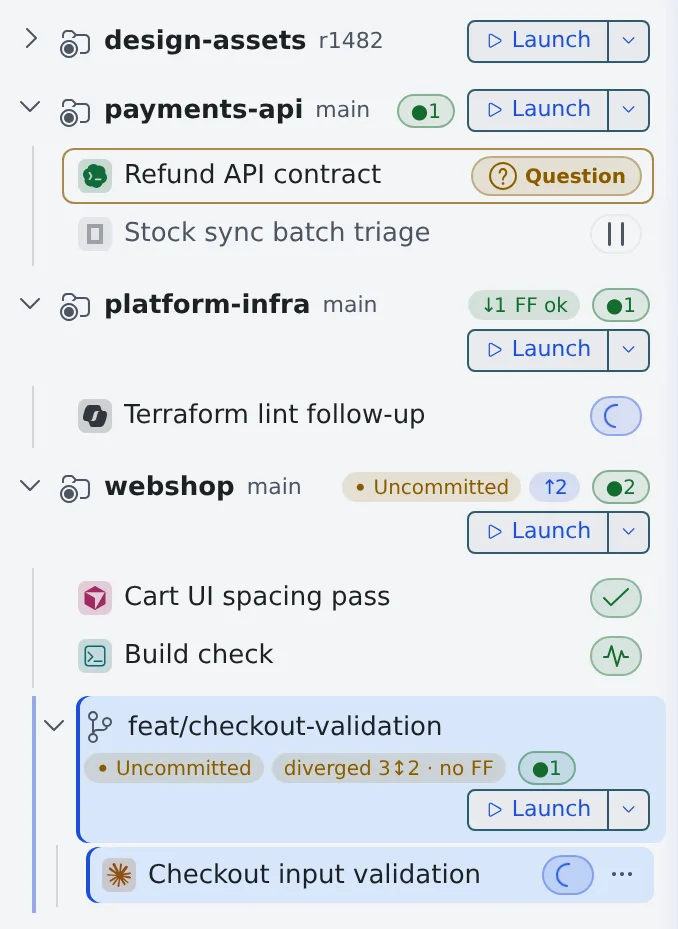
| Badge | Meaning |
|---|---|
| Uncommitted | There are changes not yet committed |
| ↑N | N commits ahead of origin (not pushed) |
| ↓N FF ok | origin is N commits ahead and can be fast-forwarded cleanly |
| ↑N ↓N needs merge | Diverged from origin. A merge or rebase is needed |
| = parent | The worktree is at the same commit as its parent |
| unmerged N | The worktree has N commits that are not in the parent yet |
| parent +N · FF ok | The parent is N commits ahead and the worktree can take them with a fast-forward |
| diverged N↕M · no FF | Both the worktree and the parent have their own commits. A merge or rebase is needed |
| n/a | The relationship cannot be told, for example with a detached HEAD or a repository with no commits |
↑and↓compare with origin. A worktree’s badges (the ones that say “parent”) compare with the branch of the parent working copy- “Parent” is the upstream of the parent working copy’s branch (
origin/develop, for example). Without an upstream, the badge compares with the parent working copy’s HEAD - A pull request merged on GitHub shows up after the next fetch (automatic, every 10 minutes), without fast-forwarding the parent working copy
- Commits the parent working copy has not pushed are not compared
- Hover over a badge to see what it compares with and each side’s own commit count
The numbers at the end of a row mean this.
| Shown | Meaning |
|---|---|
●N |
The number of running sessions |
| A plain number | The number of stopped sessions |
| A coloured number | The pane number showing this repository’s commit graph |
- For a collapsed repository, the counts include its worktrees’ sessions
- Every icon is listed in Icons, badges and menus
What you can do with right-click
Section titled “What you can do with right-click”Right-click a row for this menu. Some items are hidden depending on state and location.
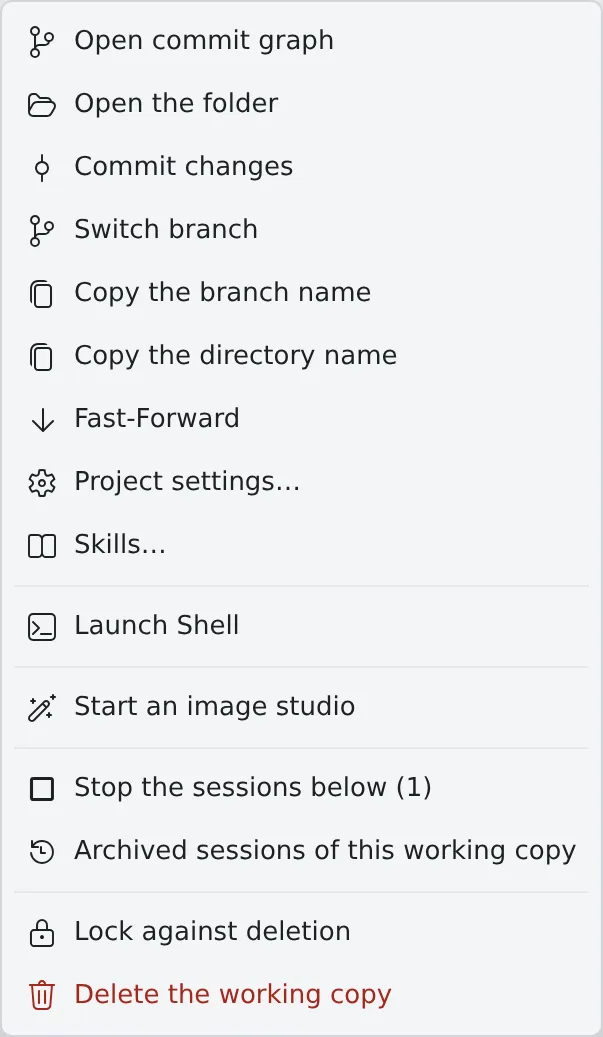
| Item | What it does |
|---|---|
| Open commit graph, Open the folder, Commit changes | Commit in the commit graph |
| Switch branch, Copy the branch name, Copy the directory name | What they say |
| Fast-Forward | Fast-forwards to the upstream. On a worktree it becomes “Fast-forward from origin/develop” (“Fast-forward from parent” without an upstream) |
| Initialize Git Flow | Initialize Git Flow. Shown on the base working copy only |
| Project settings… | Check the MCP definitions committed in the repository (Add an MCP server to your sessions) |
| Skills… | Check the skills the repository gives each agent (09) |
| Share… | Share this working copy’s sessions with other members (Share a conversation) |
| Launch Shell | Opens a shell session in that working copy |
| Start an image studio | Starts an image studio in that working copy (Finish an image in the studio). Shown only while the workspace is running and image generation is available |
| Working sets | Assigns the copy to a working set (Narrow the view with working sets) |
| Stop the sessions below | Stops the sessions running in that working copy and the ones under it, together (Stop and resume a session) |
| Archive all stopped sessions | Archives the stopped sessions of that working copy together |
| Archived sessions of this working copy | Opens the archive list narrowed to that working copy |
| Lock against deletion, Unlock (allow deletion) | Keeps the working copy out of automatic tidying and stops it being deleted. A lock icon appears on the row, and “Delete the working copy” stays greyed out until you unlock (Clear away finished sessions) |
| Delete the working copy | Clear away finished sessions |
- “Stop the sessions below” and “Archive all stopped sessions” appear, with a count, only when there is something to act on
When it goes wrong
Section titled “When it goes wrong”A pull request was merged, but the badge still says “unmerged”
Section titled “A pull request was merged, but the badge still says “unmerged””A squash merge does not keep the commits’ ancestry, so a branch merged on the service does not turn ”= parent” or “parent +N · FF ok”.
“Launch” cannot be pressed
Section titled ““Launch” cannot be pressed”The workspace is stopped, or no agent is available. Hover over the button to see which.