
Stop a session that spends too much with a budget
Give a session a budget in US dollars and it stops when its estimated spend reaches the budget. Once it has stopped, you can raise the budget and carry on.
How it works
Section titled “How it works”| What you do | What the agent does |
|---|---|
| Give the session a budget | Works as usual |
| — | When its estimated spend reaches the budget, stops once the current turn ends |
| Raise the budget and resume | Carries on from where it stopped |
If one turn alone runs on to twice the budget, the session is stopped at once, mid-turn. The notification then reads “Halted mid-turn: far past its budget”. Both stops are the resumable stop, which keeps the conversation.
Set a budget
Section titled “Set a budget”| Where | How |
|---|---|
| When you start it | “More” → “Budget (USD)” in the start dialog |
| After it has started | “Spend budget…” in the session’s ⋯ menu, or press the spend shown in the chat |
| For every new session | “Budget for new sessions” in ⚙ Settings → “Agents” |
- “Budget for new sessions” applies to every session started without a budget of its own, including sessions started by
create_sessionand by schedules - 0 or empty means no budget
- You can give it to the cent
See the spend
Section titled “See the spend”The chat’s context row shows the spend so far against the budget, as ”≈$1.84 / $5.00”.
- It turns amber from 80% of the budget and red when the budget is reached
- Press it to open the dialog that changes the budget
- For a session that started child sessions with
create_session, the children’s spend sits beside it, as “children ≈$0.42”. The children’s spend is only shown here and is not counted against this session’s budget: each child has its own
When it stops
Section titled “When it stops”A session stopped by its budget shows the “paused: budget” mark on its row, and the notification centre says “Stopped by its budget”.
- Press “Raise budget & resume…” in the row’s ⋯ menu or on the notification
- Check the spend so far and enter a new budget
- Press “Raise & resume”
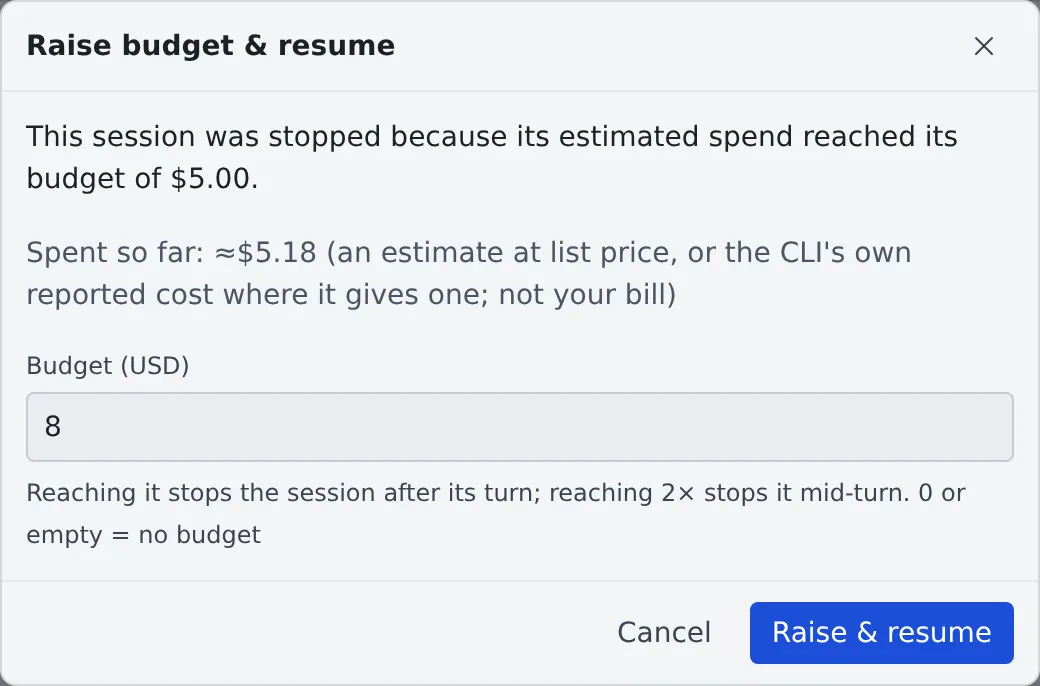
- Only a budget above the spend so far is accepted
- Resuming without raising the budget gives the session one more turn, after which it stops again
What the figure is
Section titled “What the figure is”The spend is an estimate and not your bill.
- It is an estimate at list price from the session’s own transcript, or the CLI’s own reported cost where it gives one (opencode)
- On a subscription plan, it is what the same use would cost through the API
- For Claude Code, it includes the session’s subagents and Workflow agents. The usage view’s totals include them too
- A fork starts from $0: the history it copied is not charged to it
Some sessions are never stopped by a budget.
| Case | Why |
|---|---|
| A model with no price | It cannot be estimated, so the budget has no effect (the dialog says so) |
| Kiro, Cursor, Antigravity | Their transcripts carry no token counts |
| The self-hosted engine | Its spend is $0 |