
Check memory changes
What an agent writes into memory is shared with every agent at once, without your approval. The Changes tab shows which memory who changed and when, and lets you revert a bad change.
How it works
Section titled “How it works”| What you do | What the agent does |
|---|---|
| Read the list of changes and their diffs in the Changes tab | Every time it saves a memory, one change is recorded |
| Revert a bad change, or make agents forget the memory | Uses the reverted text, or no longer sees the memory, from its next read |
Reverting and forgetting never erase history: they are recorded as new changes, so the undo can be undone too.
Read the list of changes
Section titled “Read the list of changes”Open the Changes tab of the Memory view. The newest 100 changes are listed, newest first.
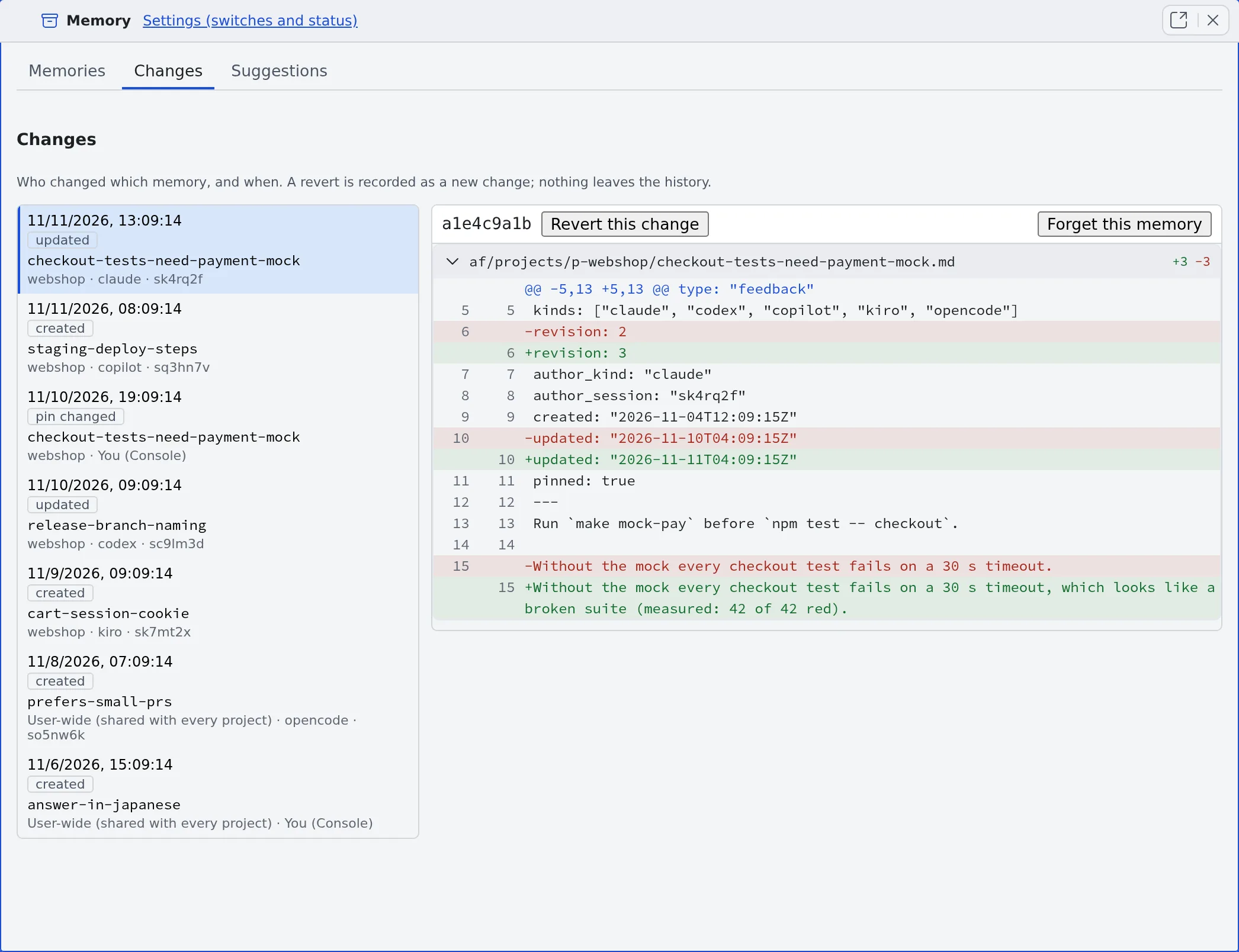
| What a row shows | Meaning |
|---|---|
| Operation | created, updated, forgotten, reverted, imported, pin changed, replaced or retired. Changes written by lint show as lint (lint-rename for a renamed path) |
| Memory and scope | The memory’s name, and its project or User-wide (shared with every project). When one change moved several memories, ”+ names” follows |
| Author | The agent kind and session. Your own actions show as You (Console) |
- Pick a row to see its diff on the right. A diff that holds what looks like a secret is not shown
- Load older changes adds 100 more each time, back to the first change
- From a terminal,
af-memory changes --limit Nlists up to 300
Revert a change
Section titled “Revert a change”- Pick the change you want to undo
- Press Revert this change. It brings the memory back to how it was before that change
- In Revert this change?, press Revert this change
- Only a memory’s newest change can be reverted. When it has later changes, “This memory has later changes. Only the newest change can be reverted.” appears
- If the text you bring back looks like a secret, Possible secrets found appears with the values masked. Press I checked, continue only once you are sure it is not a real secret
Make agents forget a memory
Section titled “Make agents forget a memory”When you want the memory itself out of agents’ view rather than its earlier text back, pick its newest change and press Forget this memory. You can undo it from the Memory view’s Forgotten chip.
Undo an old memory review’s changes at once
Section titled “Undo an old memory review’s changes at once”Earlier versions had a review that had finished sessions suggest memories. It is gone, but the changes it published (author review) remain in the list.
- Pick a change whose author is
reviewand press Undo this review’s changes - Every memory that review published is put back, as new changes
- A memory someone edited after the review is left as it is and named in the result
- Running it again retries only what is left
When it goes wrong
Section titled “When it goes wrong”“The history holds no text to bring back for this change” appears
Section titled ““The history holds no text to bring back for this change” appears”The change has no earlier version in the history to go back to, such as the forget of a file put in place by hand. It cannot be reverted.
“this change cannot be reverted” appears
Section titled ““this change cannot be reverted” appears”The memory’s past revisions were purged from the history, so there is nothing to go back to. You can still forget the memory.
Related
Section titled “Related”- Read and correct agent memory: read and correct memories in the Memory view
- Use memory tidy-up: approved suggestions show in this list as changes by
consolidator - Find stale memories: changes written by lint show with the author
lint