
Branch from a past message
From one of your own past messages you can create a new session that carries the conversation up to that point. Use it for “I want to try another approach from that instruction” or “I took a wrong turn back there”, without copying the conversation.
How it works
Section titled “How it works”| What you do | What the agent does |
|---|---|
| Press “Branch here” on your message and choose where to start | Starts a new session of the same kind, holding the conversation up to that point |
| Send the reworded instruction in the new session | Takes it as the continuation of the carried conversation |
The current session is left as it is.
Branch
Section titled “Branch”- Hover (or focus) one of your own past messages, and “Branch here” appears under the bubble
- Pressing it opens a confirmation. It shows the branch point, how many exchanges are carried, and that the current session stays as it is
- Choose “Where to start” and press “Branch”
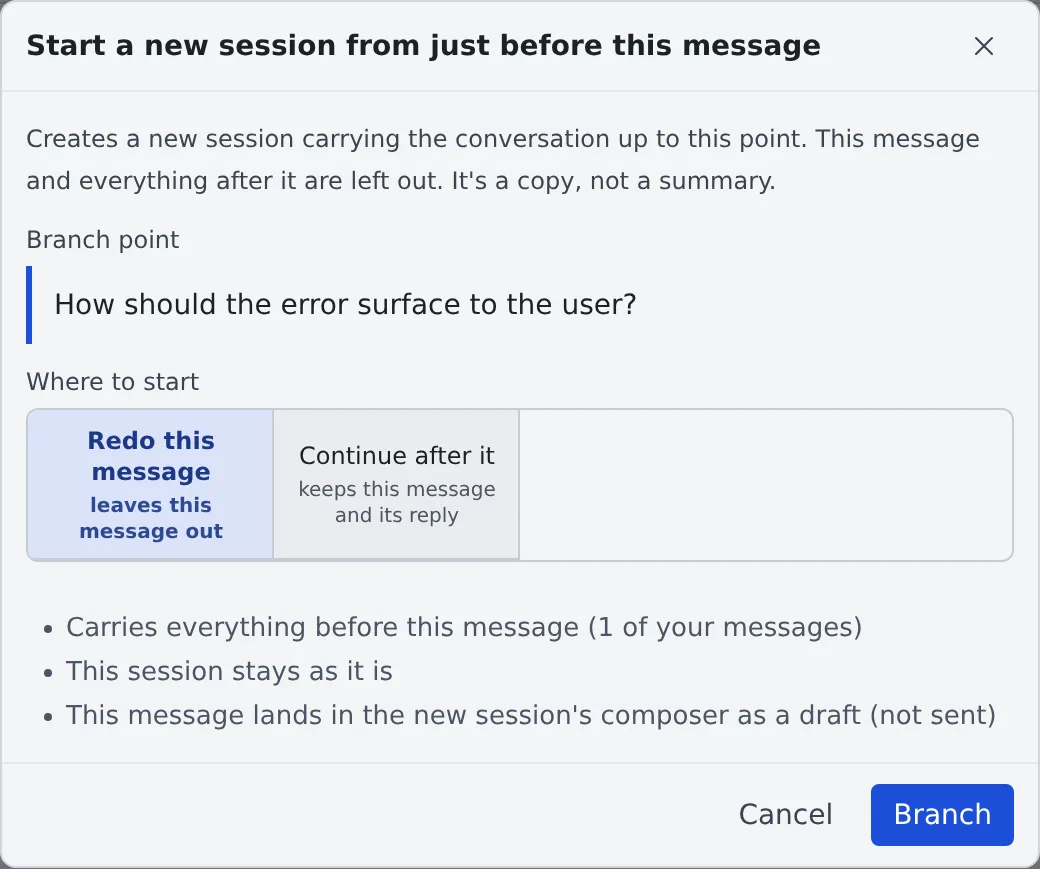
| Where to start | What is carried | Use it when |
|---|---|---|
| Redo this message (default) | Everything before this message. The message itself lands in the new session’s input box as a draft (not sent) | You want to reword the instruction |
| Continue after it | This message and the reply it got | You want to head another way from a point that went well |
With “Redo this message”, sending it reworded or as it was is one action either way.
How it differs from a handoff
Section titled “How it differs from a handoff”| Branch | Handoff | |
|---|---|---|
| Conversation | Copied as it is | Summarised and passed on |
| Agent | The same kind | Can go to another agent |
| Use it when | The exact wording and the fine details matter | You want another agent to take over |
Handoff is in Hand off to another session or agent.
When it goes wrong
Section titled “When it goes wrong”“Branch here” is not there
Section titled ““Branch here” is not there”One of these applies.
- It is the agent’s message. You can branch only from your own
- The message is still being sent
- The session’s kind or execution method cannot branch. Check the “Fork from a past message” row of the Agents reference
Related
Section titled “Related”- Reply to a session: reuse something you sent earlier