
Read an answer in your own language
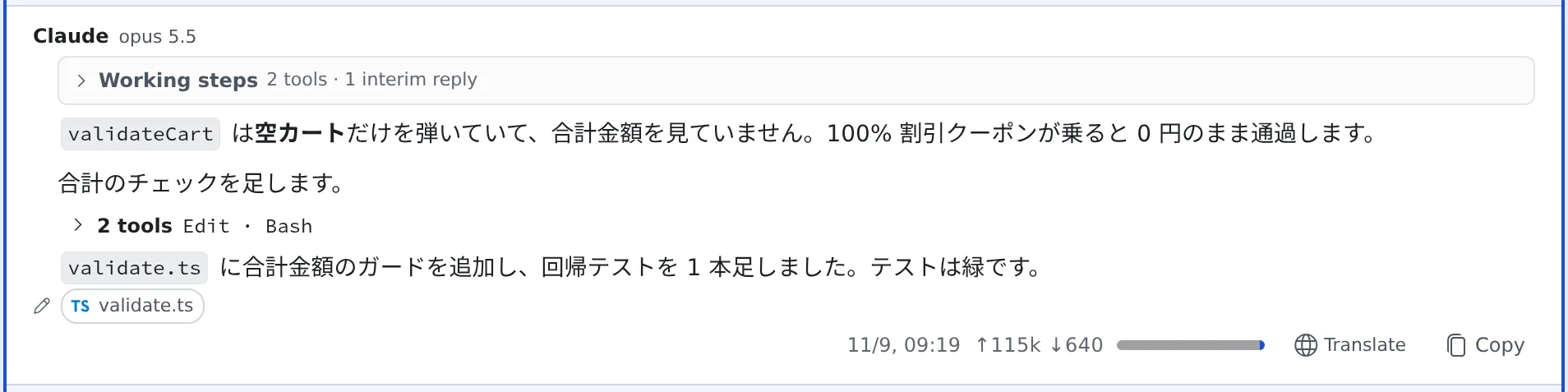
When an agent answers in a language you do not read, one button shows just that answer in your language. The conversation does not move and the agent’s context does not grow.
How it works
Section titled “How it works”| What you do | What happens |
|---|---|
| Press “Translate” under an answer | One model call outside the session translates that answer into your display language and shows it in its place |
| Press “Original” | The agent’s own text comes back. No model is called |
Unlike sending “please answer in English” again, no session turn is used.
Translate
Section titled “Translate”- In the chat view, press “Translate” under an answer
- That answer alone is replaced by its translation
- To go back, press “Original”
- It translates into the Console’s display language. If you fixed Reply language to 日本語 or English in ⚙ Settings → “Assistant”, it uses that
- Only prose is translated. Code blocks, commands, paths and tool output stay as they were
- Highlights stay on the original, so they are hidden while the translation is shown
- A question card waiting for your answer offers “Translate” too. Only the display changes: the original choice is what gets sent
When the button appears
Section titled “When the button appears”| The answer | Button |
|---|---|
| Is written in a language other than your display language | Shown |
| Is in English with a few Console labels (“Disabled”, “On demand” …) or product names in it | Shown |
| Genuinely mixes both languages | Not shown (re-saying what you can already read buys nothing) |
| Is in a session someone else shared with you | Not shown (a translation runs in the owner’s workspace) |
What it spends
Section titled “What it spends”- Tokens are spent only when you press it. It shows up in usage as “Answer translation (mirror)”
- A translation is kept until that session is deleted. The same text is free from the second press on, and the translation is still there after you re-open the pane or open the session on your phone
- Changing this feature’s agent or model makes the next press translate afresh. Translations from the earlier combination are not lost; switch back and they are there
Change the setting
Section titled “Change the setting”Switch it in ⚙ Settings → “AI assistance”, under Answer translation (mirror).
| Setting | What it does |
|---|---|
| Answer translation (mirror) off | The “Translate” button is not shown at all |
| Translate automatically on | The button is pressed for you when a turn finishes. Off by default |
Automatic translation covers only answers that arrive while you have that session open. Answers already on screen when you open it are not translated on their own (the button is offered as before). Of the translation settings, this is the only one that spends tokens without a press.
Related
Section titled “Related”- Reply to a session: the chat view and question cards
- Save a conversation as Markdown: keep a conversation as a file