
See how sessions relate over time
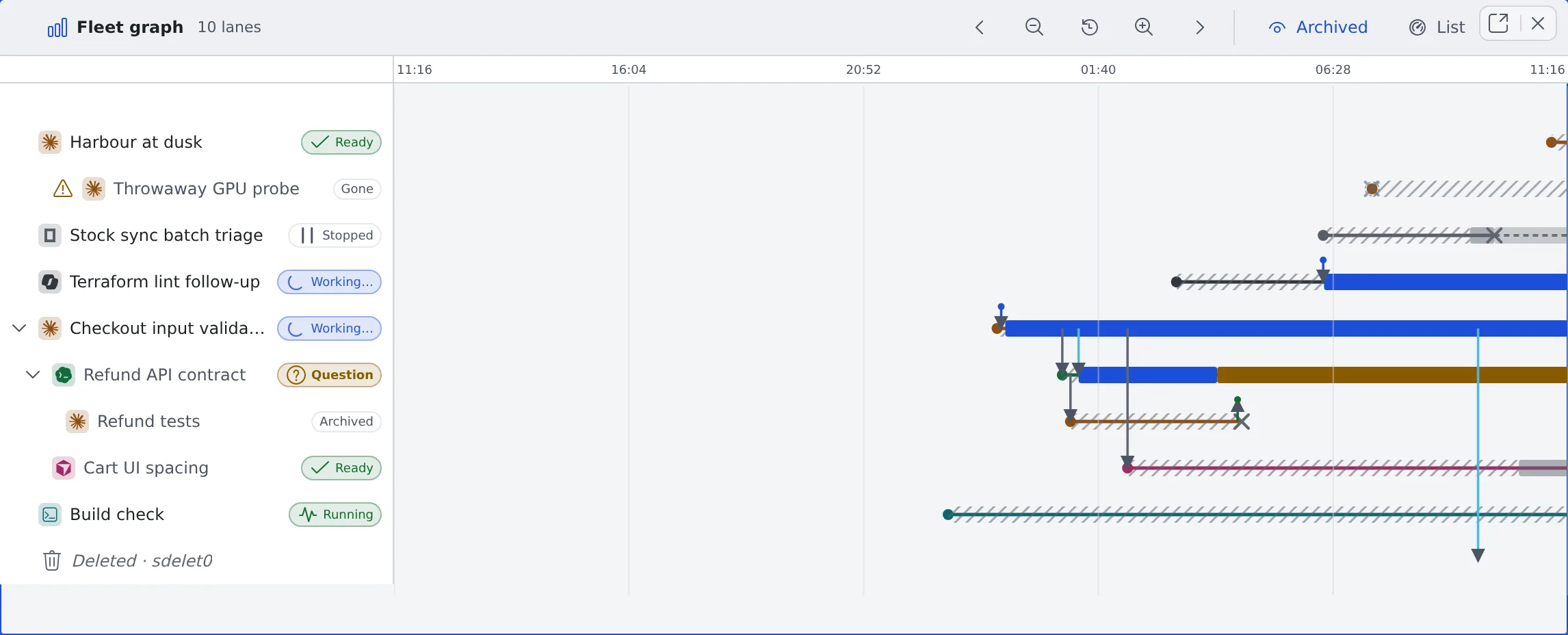
The fleet graph shows on one figure which session started which, what passed between them, and when each was working, waiting or stopped. The sessions overview is a snapshot of now; this is how it got there.
How it works
Section titled “How it works”| What you do | What appears on screen |
|---|---|
| Open the fleet graph | One lane per session on a time axis, with now at the right edge |
| Move along or widen the time axis | Past lanes and the arrows between sessions can be followed |
| Click a lane’s name | That session opens beside the graph |
Open it
Section titled “Open it”Use any of these:
- Graph in the sessions overview’s header (the same pane switches; List in the graph’s header switches back)
- The leader keys
g f - Open the fleet graph in the command palette
Ctrl (⌘)-click or middle-click on Graph or List opens it in another pane instead.
Move in time
Section titled “Move in time”It starts on the last 24 hours.
| To do this | Use |
|---|---|
| Move into the past or towards now | The arrows in the header. Scroll sideways or drag on the figure |
| Narrow or widen the window | The zoom buttons in the header. On a phone, pinch with two fingers |
| Return to the last 24 hours | The reset button in the header |
| Move up and down the lanes | Scroll vertically |
The time scale stays at the top however far you scroll.
Read a lane
Section titled “Read a lane”The left column holds the agent kind’s icon, the session’s name and its state chip.
| How the lane looks | What it means |
|---|---|
| A solid line with a coloured band (working, waiting on you, idle) | Running. It pulses at the right edge |
| A dotted line from an × to the right edge | Stopped. It can be resumed |
| It ends in an × | Archived or deleted |
| Several stretches on one lane | A session that was stopped and resumed |
- A lane no longer in the list shows Stopped — resumable, Archived — restorable or Gone
- The × is when the stop was noticed. It can be later than the session actually stopped, and its tooltip says so
- Only the name opens the session. Clicking the lane opens nothing, so dragging the figure never opens a session by accident
Read families and arrows
Section titled “Read families and arrows”- A session started from another session (a child session, a fork, a handoff) is drawn right under its parent’s lane, with a line from the parent to where it was born
- Collapse child sessions on the parent’s row hides its descendants. The number hidden shows as “+N”
- When the parent is outside the window or gone, the lane says “Parent lane … isn’t drawn in this figure”
Arrows are what passed between sessions.
| Arrow | What passed |
|---|---|
| Spawned, forked, handoff | A new session was born |
| Instruction, report | An instruction, and its report |
| Session-to-session message | A message between sessions, with its kind (request, question and so on) |
| A short arrow with a dot at its tip | Something that came from outside the sessions: a conversation, a person, a scheduled execution, the Discord bridge, the Slack bridge or auto-resume, told apart by colour and label |
Clicking an arrow opens its conversation or lane.
Look into the past
Section titled “Look into the past”- Archived in the header shows or hides archived lanes. In this figure they are shown from the start
- Stopped sessions are always drawn
- Far enough back, a line marks the edge of what is kept. There are three: where activity bands and arrows end, where lineage ends, and where only the outline of births and ends is left
- A stretch with nothing drawn still keeps its axis and controls, so you can come back from it