
Try Google sign-in on a preview
Google accepts only redirect URIs registered on its OAuth client, and a preview URL changes at every start. So during development only, the Control Plane signs you in in Google’s place. Your app changes its settings (issuer, client id, client secret) and nothing else: no code changes, nothing to register in the Google Cloud console.
How it works
Section titled “How it works”| What you do | What the agent does |
|---|---|
| Point the app’s settings at the development issuer | Writes the settings from “App configuration examples” in ⚙ Settings |
| Open the app on a preview URL and sign in | ― |
| Create test personas to try different permissions | ― |
The workspace receives these values at every start.
| Environment variable | Content |
|---|---|
AF_DEV_IDP_ISSUER |
The issuer |
AF_DEV_IDP_WELL_KNOWN |
The discovery URL |
AF_DEV_IDP_CLIENT_ID |
A client id for your workspace alone |
AF_DEV_IDP_CLIENT_SECRET |
The client secret |
Check that you can use it
Section titled “Check that you can use it”If ⚙ Settings, “Preview subdomains” shows “Development OIDC IdP (stands in for Google sign-in)”, you can. There is no per-workspace switch.
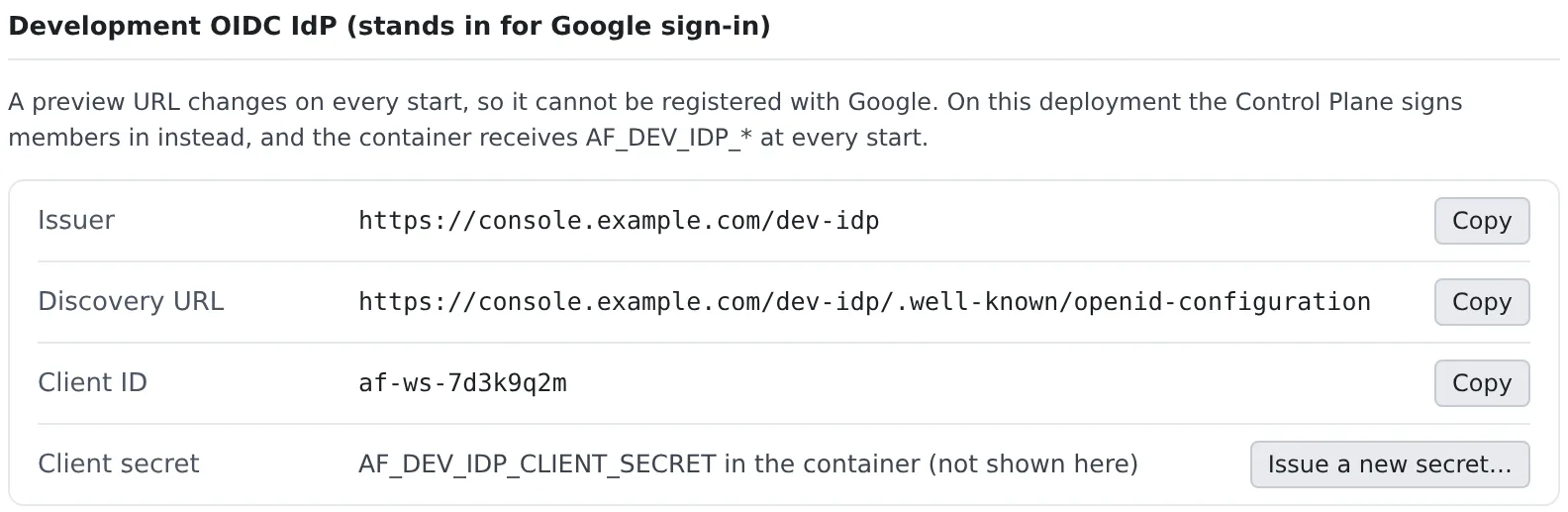
- It is there on a deployment that issues preview subdomains, unless the administrator turned “Serve the development OIDC IdP” off. It is on by default
- The client secret is not shown on screen. Read
AF_DEV_IDP_CLIENT_SECRETinside the container - The client id and secret stay the same across restarts
Configure the app
Section titled “Configure the app”“App configuration examples” writes out the settings for Spring Boot, Auth.js, Go, Better Auth and environment variables alone.
| Choice | What it decides |
|---|---|
| Form | For Spring Boot “dev profile (recommended)”, “One file with defaults” or “Environment only”; for Auth.js “Auth.js v5” or “next-auth v4”; and so on |
| Port | Picked from the list of exposed ports |
| Include preview settings | Whether to add the settings for the preview URL |
| Values | Refer to environment variables, or fill in the values. The client secret is always a reference to its variable |
The idea is “use the development issuer only when the variables are there”. Two examples:
Auth.js (NextAuth) v5
import NextAuth from "next-auth"import Google from "next-auth/providers/google"
export const { handlers, auth } = NextAuth({  providers: [    Google(      process.env.AF_DEV_IDP_ISSUER        ? {            issuer: process.env.AF_DEV_IDP_ISSUER,            clientId: process.env.AF_DEV_IDP_CLIENT_ID,            clientSecret: process.env.AF_DEV_IDP_CLIENT_SECRET,          }        : {},    ),  ],})
With v4 it is GoogleProvider({ wellKnown: process.env.AF_DEV_IDP_WELL_KNOWN, clientId, clientSecret }). Giving the same
values to a generic OIDC provider works too.
Spring Boot: keep the registration name google and swap the provider side.
# application-devidp.yml (activate with SPRING_PROFILES_ACTIVE=devidp, in the workspace only)spring: security: oauth2: client: registration: google: client-id: ${AF_DEV_IDP_CLIENT_ID} client-secret: ${AF_DEV_IDP_CLIENT_SECRET} scope: openid,email,profile provider: google: issuer-uri: ${AF_DEV_IDP_ISSUER} resourceserver: jwt: issuer-uri: ${AF_DEV_IDP_ISSUER} # only for a backend that verifies the ID token itselfWith server.forward-headers-strategy=framework set, Spring builds the callback URL from the preview’s host.
Sign in
Section titled “Sign in”Press sign-in in the app and you are signed in as whoever is signed in to the Console. There is no password prompt.
| Your Console sign-in | What the app receives |
|---|---|
| Signed in with Google | Your real Google sub and email address, so the user the app already has matches as it is |
| Anything else | Your Console email address and a stable sub of the form af-… |
A colleague who opens a preview you shared (Use preview subdomains) signs in as that colleague.
The browser can only be sent back to one of these. Anything else, including a URL from before a restart, ends on an error page instead of a redirect.
- A port of your current preview URL that is in the list of exposed ports
- A port you opened for yourself without adding it to the list (while that stays open, and only when you are the one signing in)
http://localhost:<port>orhttp://127.0.0.1:<port>(this works in the browser pane too)
Set the app’s own URL (AUTH_URL and the like) from AF_PREVIEW_URL_<port>, so that the callback it sends is exactly that.
Try it with test personas
Section titled “Try it with test personas”To try different permissions such as admin and viewer, add identities under “Test personas”.
- Enter a “Handle” and, if you like, a “Display name”, and press “Add”
- When you sign in to the app, a confirmation page appears; pick yourself or a persona
- A persona’s address is
<handle>@example.testand itssubstarts withpersona:, so it can never be a real member - Up to 20 per workspace. A handle is 1 to 32 characters of lower-case letters, digits,
.,_and-, starting with a lower-case letter or a digit - The confirmation page can be answered once, within 5 minutes. Cancel returns an
access_deniederror to the app - A
prompt=nonesign-in goes through silently as you. A workspace without personas never shows the confirmation page
Use it from an app on your own machine
Section titled “Use it from an app on your own machine”An app on your own machine at http://localhost:<port> can sign in with the same IdP. It works even while the workspace is stopped.
- Read the three values in a workspace terminal:
printenv AF_DEV_IDP_ISSUER AF_DEV_IDP_CLIENT_ID AF_DEV_IDP_CLIENT_SECRET. The secret exists only inside the container, so start the workspace to read it - Set the three as environment variables on your machine
- Set the app’s callback to
http://localhost:<port>/<callback path>.127.0.0.1works too, on any port - Stay signed in to the Console in that machine’s browser. No other login is needed
- Treat the secret like a password. Keep it out of git, chat and screenshots
- While the workspace is stopped, only redirects to
localhostand127.0.0.1are accepted. Preview URLs work only while it is running - To use the same settings on your machine and in the workspace, pick the form that refers to environment variables under “App configuration examples”. For Spring Boot the
devidpprofile (SPRING_PROFILES_ACTIVE=devidp) is recommended, so the production configuration never names the development issuer
Replace the secret
Section titled “Replace the secret”“Issue a new secret…” replaces both the client id and the secret.
- The old pair stops working at once, along with every copy you set on your machine
- The new pair reaches the container at its next start, so stop and start the workspace. Replace both on your machine as well
Good to know
Section titled “Good to know”- Only sign-in is replaced. You get no Google API access token (Calendar, Drive and so on) and no
picture - Tokens live 10 minutes; a sign-in code lives 60 seconds
- A sign-in request cannot carry a
promptother thannone,max_age, or aresponse_modeother thanquery; the app gets aninvalid_requesterror. Remove theprompt: "consent"that some Google examples carry - The signing key changes every 30 days, and the old key stays in the JWKS for 24 hours. Do not pin the key; let the library take it from the discovery URL
When it goes wrong
Section titled “When it goes wrong”The “Development OIDC IdP” block is missing, or the issuer answers 404
Section titled “The “Development OIDC IdP” block is missing, or the issuer answers 404”The IdP is off on the deployment, or the environment has no preview domain. Ask your administrator.
An error page after signing in
Section titled “An error page after signing in”The URL to return to was not accepted. Check that you are not on a URL from before a restart or on a port outside the list, and set the app’s URL from AF_PREVIEW_URL_<port> again.
Related
Section titled “Related”- Use preview subdomains: preview URLs and the exposed ports
- See a web app you started: open it in the browser pane