
Bring your Claude Code setup
Put the skills, subagents and hooks you keep in your local ~/.claude into the workspace’s Claude Code configuration folder,
and sessions use them as they are. The skills you placed can be checked on a Console settings screen.
How it works
Section titled “How it works”| What you do | What the agent does |
|---|---|
| Put skill, subagent and hook files in the configuration folder | Loads and uses them from the next session it starts |
| Check the skills you placed in ⚙Settings → Skills | — |
| Ask an agent to edit your own skills and the like | Edits your personal skills, subagents and hooks, only when asked |
What goes where
Section titled “What goes where”Part of it is covered by settings screens.
| Where it lives in your local Claude Code | In the workspace |
|---|---|
The global CLAUDE.md |
⚙Settings → Agent instructions (Write down how you work, once) |
| MCP server configuration | ⚙Settings → MCP servers (used by sessions) (Add an MCP server to your sessions) |
| Skills, subagents, hooks | Files in the configuration folder (the table below) |
The configuration folder is /var/lib/af/claude. It can differ per deployment, so check by running echo $CLAUDE_CONFIG_DIR in a shell.
It is the counterpart of ~/.claude on your own machine.
| What | Where | Shared with the team |
|---|---|---|
| Hooks, skills and subagents for the team | The repository’s .claude/ (committed) |
Yes |
| Your skills | <config folder>/skills/<name>/SKILL.md |
No |
| Your subagents | <config folder>/agents/<name>.md |
No |
| Your hooks | The hooks key of <config folder>/settings.json |
No |
- Claude reads these when a session starts. A change applies to sessions started afterwards
- Agent Fleet does not inspect these files. Before relying on them, try yours in a real session
- Skills in
skills/also appear in the session view’s skill picker - The folder lives on dedicated storage. Stop / start, recreating the workspace and cleaning home leave it alone
Edit them
Section titled “Edit them”Edit from a shell or a Terminal (CLI) session. The Console’s file browser does not show this folder, because it also holds sign-in data.
You can also ask an agent to edit them. An agent touches these files only when asked, and only your personal skills, subagents and hooks. Credentials and Agent Fleet’s own hook entries are off-limits to agents too.
Check your skills
Section titled “Check your skills”⚙Settings → Skills lists each agent’s personal skills, read-only. Besides Claude, Codex, OpenCode and Muse each have their own tab.
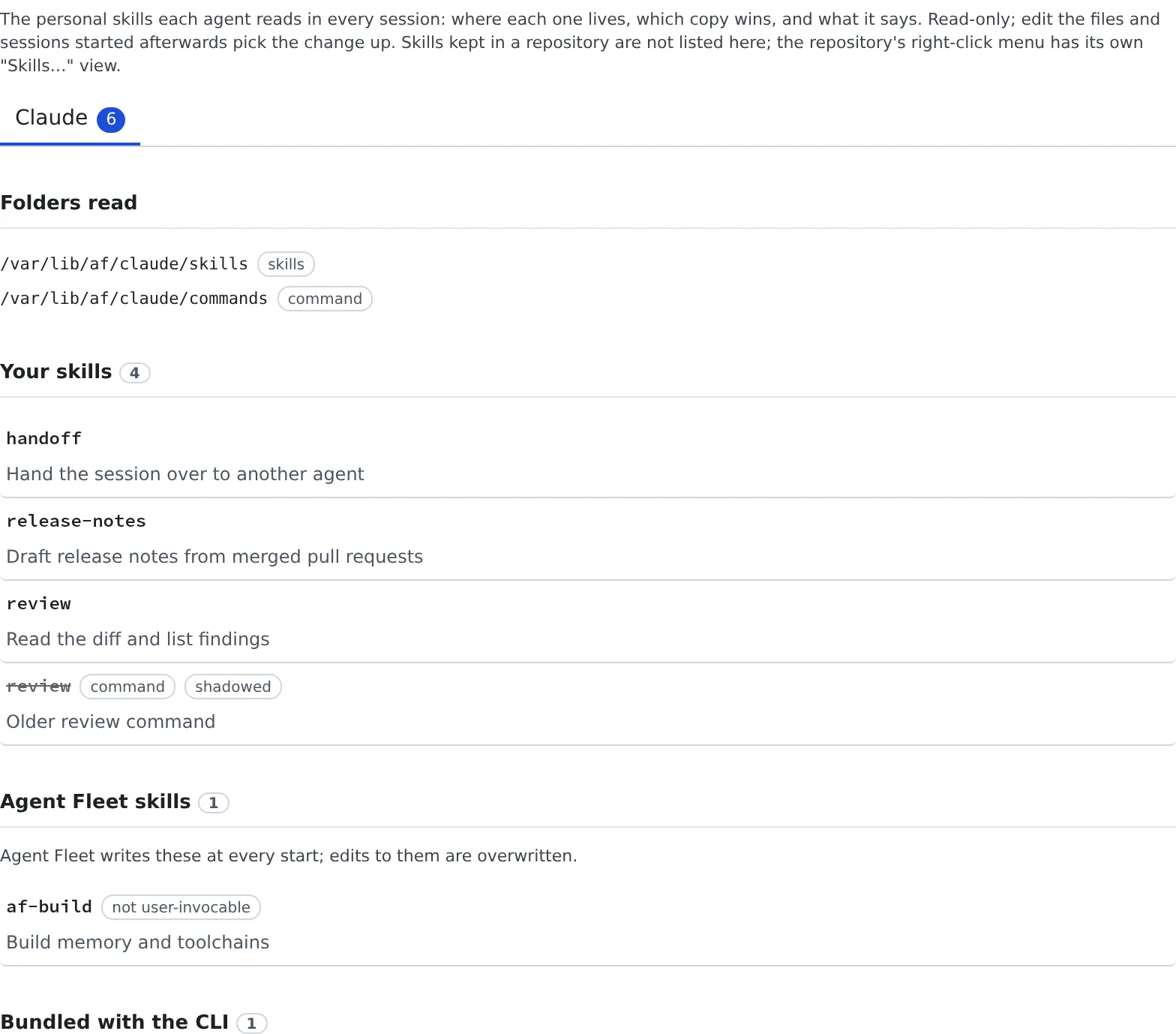
| What it shows | Contents |
|---|---|
| Folders read | The folders the agent reads skills from. One that does not exist yet is marked “not created”, so you know where to create it |
| Your skills | Skills you placed |
| Agent Fleet skills | Skills Agent Fleet writes at every start (af-*). Edits to them are overwritten |
| Bundled with the CLI | Skills built into the CLI. They have no files |
- A skill that loses to another of the same name is struck through as “shadowed”, and the winner is named
- Open a skill for its path, its
SKILL.mdand the other files in its folder - Cursor, Antigravity, Kiro and Copilot have no personal skills folder
Skills kept in a repository are not listed here. Right-click the repository’s row in the project tree and open “Skills…” to see, per agent, the folders it reads, the copy that wins and the files’ contents. You can also check how the list changes when a session starts in a subdirectory.
Writing hooks
Section titled “Writing hooks”- Do not edit Agent Fleet’s hooks.
settings.jsonholds entries that report session state to the Console: the ones whose command runssession-statusorsession-push-notification. Without them that session’s state no longer shows in the Console (the Agent adds them back at start) - The
PreModelSwitchentry that keeps/modelfrom stopping at claude’s “Switch model?” is Agent Fleet’s too. After a switch, the next message rereads the whole history at the uncached price - Turn the RTK entry (
rtk hook claude) on and off with RTK on the Claude Code card, not by editing (Check prices and usage) - Your own hooks and other keys stay. A hook of yours on the same matcher (
Bash, say) survives RTK being switched on and off - Do not put the word
session-statusin a command. It would be mistaken for an Agent Fleet entry - Write them for the workspace. You can rely only on what the image has (bash, jq, node, python) and what you installed into
~/.localyourself./usr,/opt,/tmpand the like revert to the image, so keep scripts in your home - Start
claude -pfrom a hook asenv -u AF_SESSION_NAME claude -p …. Otherwise the child claude’s activity is reported as the parent session’s, and its state can go wrong. Run your hook once and check that the session’s state stays right