
Work in parallel with worktrees
Give each session its own working copy (a worktree), and several agents can work in the same repository at once without their changes colliding. Choose where to work, and on which branch, under Location in Start working.
How it works
Section titled “How it works”| What you do | What the agent does |
|---|---|
| Choose “New worktree” under Location, and set the base branch and the branch name | Works only inside its own worktree |
| If needed, set a folder of the repository as the “Working folder” | Starts in that folder |
Agent Fleet creates the worktree. Right before launching, it moves the base branch to origin’s tip and branches from there.
Choose the location
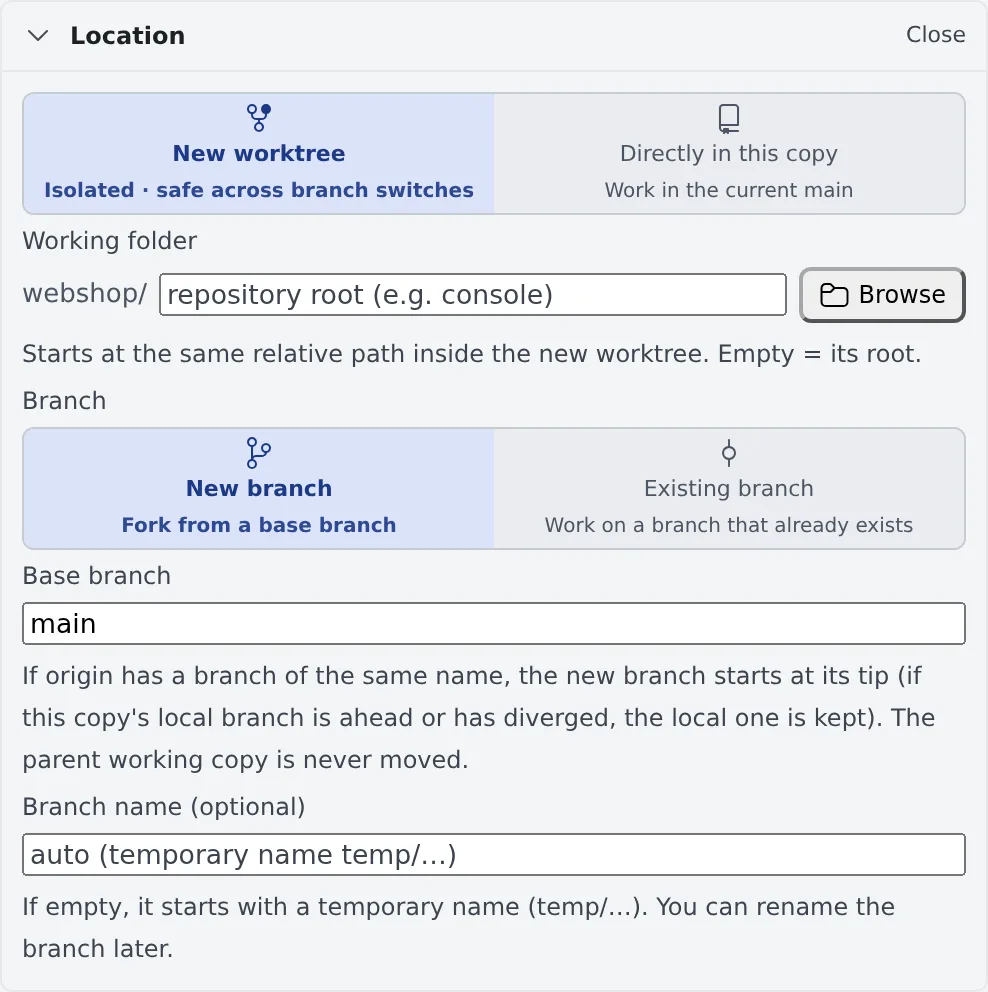
Section titled “Choose the location”The Location row of Start working says in one line where the session will start. Press Change to open it.
| Choice | What happens |
|---|---|
| New worktree (default) | Creates a working copy for this session alone and starts there. Branch switches in other sessions do not touch it |
| Directly in this copy | Starts in the working copy you picked, on its current branch |
Choose the branch
Section titled “Choose the branch”With “New worktree”, choose under Branch whether to cut a new branch or use one that exists.
| Choice | What you enter | What happens |
|---|---|---|
| New branch | The base branch, and a branch name (optional) | Cuts a new branch from the base. With no name, it starts under a temporary name temp/… |
| Existing branch | The branch to use | Checks that branch out into a new working copy, brings it up to date, and starts |
- The worktree’s folder name is made from the branch name
- A session started under a temporary name can be named later with Rename the branch in its ⋯ menu (Start a session)
- When the repository has branch naming rules (git-flow and the like), the branch name and the base come from them. A name outside the rules only gets a warning and can still be used
The base follows origin’s tip
Section titled “The base follows origin’s tip”A new branch is cut from the tip of the same-named base branch on origin. Starting from an old clone does not mean
starting from a commit weeks old.
- Only the new worktree is moved. The original working copy is left alone
- When your local base branch is ahead of
originor has diverged, ororiginhas no branch of that name, the branch is cut from the local base
When a new worktree cannot be made
Section titled “When a new worktree cannot be made”In these cases “New worktree” is not offered and the session starts directly in that working copy; the dialog says so.
| Case | What to do |
|---|---|
| You opened it from an existing worktree’s row | Create new worktrees from the original repository’s row |
| A Subversion working copy | It starts directly |
| A repository with no commit yet | After the first commit you can choose it |
Launch inside a folder of the repository
Section titled “Launch inside a folder of the repository”For work that only touches console/ or apps/web in a monorepo, narrow where the agent starts with Working folder
under Location.
- Type the path, or pick it by walking the repository’s folders with Browse. Empty means the repository root
- Combined with “New worktree”, the same relative path is looked up inside the new worktree
- If the folder does not exist on that branch, the launch is refused and nothing is created
- The folder you last started in for that repository is remembered and filled in next time
The session itself still belongs to the working copy. It is listed under the same repository in the left pane, and branch switches and tidying up work as before.
When it goes wrong
Section titled “When it goes wrong”“A local branch named … already exists”
Section titled ““A local branch named … already exists””Choose another branch name.
“A remote branch named … exists”
Section titled ““A remote branch named … exists””It is a name used before. Choose another name, or press Work on that existing branch to start on that branch.
“Branch … is in use by working copy …”
Section titled ““Branch … is in use by working copy …””git cannot check one branch out into two working copies. Choose another branch, or launch from that working copy’s row.
Related
Section titled “Related”- Start a session: Start and Start working as a whole
- Repositories and git: creating a working copy with Add in the left pane, switching branches
- Stopping, resuming and tidying up: clearing away finished worktrees